A phone check can be reassuring when you are working downstairs, away from home, or sharing care with a grandparent. Some baby monitor brands shows how baby monitors that connect to phone now range from app only cameras to hybrid systems with a dedicated screen, remote viewing, alerts, storage, and caregiver sharing.
The right setup depends on more than video quality. Some families want a parent unit beside the bed, some want detailed sleep insights, and others mainly want live viewing without a mandatory subscription. The shortlist and tables below make those tradeoffs easier to compare.

Quick Comparison: Best Baby Monitors That Connect to Phone
This table separates basic connectivity from premium app services. Product features and subscription terms can change with time, so confirm the current information before purchasing.
| Product | Best for | Phone app | Parent screen | WiFi requirement | Subscription | Key feature |
| Momcozy BM04 | Best overall hybrid | Yes | 5 inch | App access needs WiFi; screen can connect locally | No mandatory fee for basic monitoring; cloud storage optional | App or parent unit viewing |
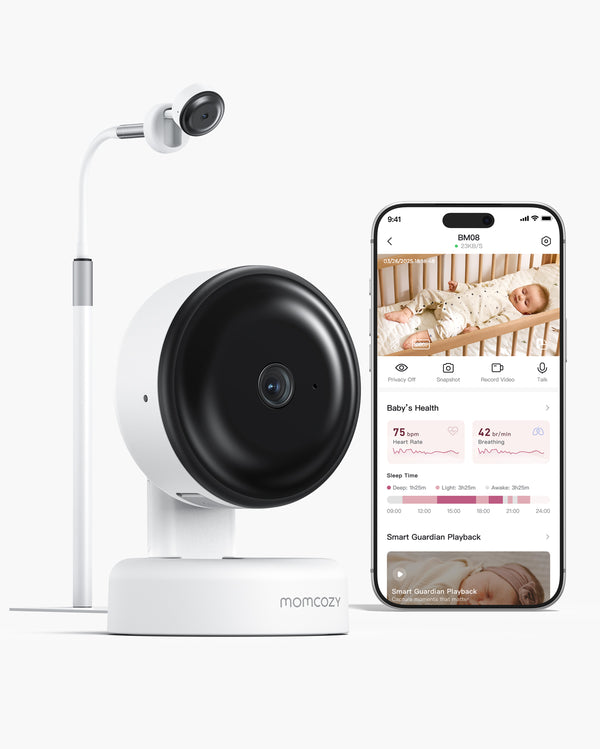
| Momcozy BM08 | App first sleep insights | Yes | No | Yes | No monthly fees | Contact free insights and 2K video |
| Nanit Pro | Premium app ecosystem | Yes | No | Yes | Not for core live view; Insights plan unlocks advanced features | Overhead view and analytics options |
| CuboAi Smart Baby Monitor 3 | AI alerts | Yes | No | Yes | One year Premium included; paid plan optional later | Covered face and rollover alerts |
| VTech RM7766HD | Budget screen and app | Yes | 7 inch | App access needs WiFi | Free live remote access | Large parent screen and remote pan and tilt |
What Is a Baby Monitor That Connects to Phone?
A phone connected monitor sends video and audio to a mobile app through home WiFi and an internet connection. The app may provide live video, two way talk, sound or motion alerts, night vision, room readings, family access, recordings, or sleep information. Feature availability depends on the hardware and service plan.
There are three common arrangements. An app only monitor uses the phone as its viewing screen. A WiFi monitor with a parent unit offers both local viewing and app access. A local monitor sends video only to its dedicated receiver and cannot offer true remote phone access without an internet path.
For a broader explanation of image quality and monitoring styles, see the Momcozy video baby monitor guide. The best baby monitor with WiFi should pair a stable connection with clear account security, while the best WiFi baby monitors also explain which features remain available without a plan.
Best Baby Monitors That Connect to Phone
Each recommendation below owns a different use case. The best pick is the one whose viewing method, alerts, subscription model, and daily controls match how your household will actually monitor.
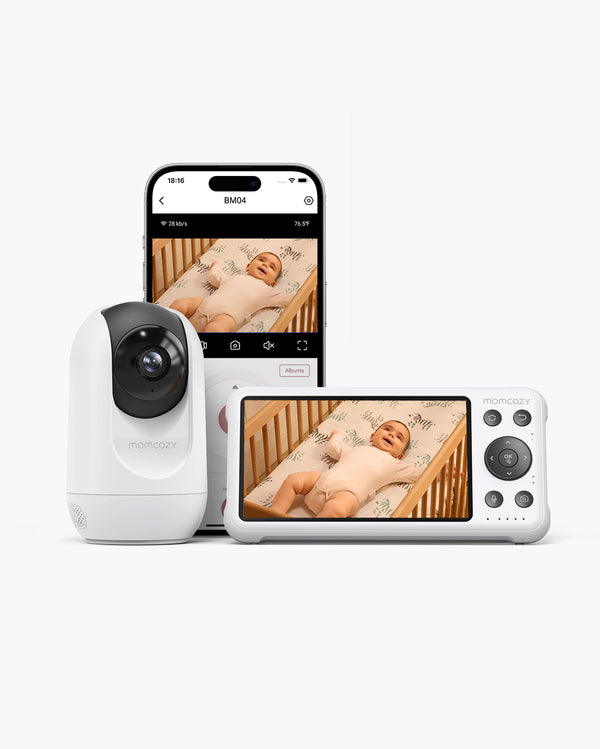
1. Momcozy BM04 Dual-Mode Smart Baby Monitor: Best Overall Baby Monitor With Screen and App
The Momcozy BM04 dual-mode smart baby monitor combines app viewing with a dedicated 5 inch parent unit. The screen connects directly to the camera for home monitoring without WiFi, while the app supports remote viewing, family sharing, motion and crying alerts, customizable safe zones, two way talk, and recording.
Its 1080p camera can pan 350 degrees, tilt 110 degrees, and connect with up to four cameras. The parent unit is especially useful overnight because checking the nursery does not occupy a phone or drain its battery. Basic camera and monitor functions do not require a monthly fee. Memory card storage and optional cloud storage are sold separately. This balance makes BM04 our best baby monitor with screen and app.
2. Momcozy BM08 Contact-Free Smart Baby Monitor: Best App First Monitor for Sleep Insights
The Momcozy BM08 contact-free smart baby monitor is designed for families who prefer phone based viewing and data rich awareness without a sock, band, patch, or clip. It uses contact free mmWave sensing to present breathing dynamics, heart dynamics, and sleep patterns in the app.
BM08 also provides 2K video, night vision, two way audio, cry and face covering notifications, privacy controls, local storage, and sleep summaries without a monthly fee. It has no parent screen and needs WiFi for app operation. BM08 is not a medical device and its insights do not diagnose illness, prevent SIDS, or replace safe sleep practices or professional advice.

3. Nanit Pro: Best Premium App Ecosystem
Nanit Pro is an app based WiFi monitor built around an overhead crib view. Official materials list 1080p video, night vision, background audio, two way talk, sound and motion notifications, temperature and humidity tracking, and caregiver access through the Nanit app.
A Nanit Insights subscription is not required for core live monitoring. Advanced sleep analytics, video history, saved clips, and selected smart alerts depend on the current plan and mount. Nanit suits families comfortable using a phone as the main screen and paying for a more extensive analytics and memories ecosystem when desired.
4. CuboAi Smart Baby Monitor 3: Best for AI Alerts
CuboAi Smart Baby Monitor 3 is an app only WiFi camera focused on alerts. Its official page highlights a 2.5K QHD camera plus covered face and rollover notifications sent to a phone. The app also supports remote viewing and multiple caregiver logins.
The purchase currently includes one year of CuboAi Care Premium. After that period, basic functions remain available, while continued premium history and analysis features may require payment. This is a strong fit for parents who value app notifications, but the camera does not replace direct checks or safe sleep measures.
5. VTech RM7766HD: Best Budget Screen and App Option
The VTech RM7766HD combines a 7 inch 720p parent display with free live remote access through a phone app. Its 1080p camera supports remote pan and tilt, night vision, two way talk, temperature and motion detection, and soothing sounds.
It is a practical lower cost hybrid alternative for families who want a large bedside screen and phone access. App and product versions can change, so confirm current mobile compatibility and recording terms before buying.
App Only vs Screen and App: Which Type Should You Choose?
How baby monitor apps compare to traditional baby monitors becomes clearest at night. An app offers remote reach and flexible sharing, while a dedicated unit provides an always available local view without competing with calls, messages, or battery use.
| Daily need | App only | Screen and app |
| Overnight checks | Phone must remain charged and available | Dedicated unit can stay beside the bed |
| Remote viewing | Strong fit when internet is available | App adds access beyond local screen range |
| Phone distraction | Notifications and other apps share the device | Parent unit keeps monitoring separate |
| Privacy | Depends on network and account security | Local screen can reduce WiFi reliance at home |
| Family sharing | Usually easy through app permissions | App can share while screen stays with parents |
| Travel | Fewer devices, but WiFi quality matters | More equipment, with local screen flexibility |
| Best user | Families comfortable with phone first monitoring | Families wanting home reliability plus remote access |
For many households, a hybrid model such as BM04 is the practical middle ground. It works as a local monitor at home and becomes a phone connected system when remote access or caregiver sharing is useful.
How to Choose the Best Baby Monitor That Connects to Phone
A polished app cannot compensate for weak connectivity or a viewing method that clashes with your routine. The best baby monitor with app access should work for the people and moments that matter in your home, so start with when, where, and who will check the baby.

1. Decide Whether You Need a Parent Screen
A phone is convenient during the day but can be awkward overnight when it is charging, silenced, handling a call, or running another app. A screen and app monitor gives you remote flexibility without making the phone your only viewer.
2. Check WiFi and Remote Viewing Needs
Remote phone viewing normally requires the camera and app to reach the internet. If you only monitor inside the home, a local parent unit may be simpler. If grandparents, a partner at work, or another caregiver needs approved access, app sharing becomes more valuable.
3. Compare Free Features vs Subscription Features
Separate live view and basic alerts from cloud history, event clips, extended analytics, and larger caregiver groups. The best baby monitor without subscription is one that provides the functions you need without forcing payment for essentials. Always review the latest plan terms at checkout.
4. Look at App Features
Prioritize stable live video, two way talk, useful notifications, family permissions, secure login, and clear recording controls. Background audio, temperature alerts, sleep insights, and event history are valuable only when they fit your routine. The Momcozy guide to connecting a baby monitor to a phone explains these viewing types in more detail.
5. Consider Privacy and Security
The Federal Trade Commission camera security guidance recommends unique strong passwords, current software, secure home WiFi, encryption, and two factor authentication when available. Share access through controlled invitations instead of giving everyone the primary password. The Momcozy WiFi baby monitor security guide adds nursery specific context.
6. Think About Real Life Use Cases
Newborn care may favor quick overnight checks, while toddler monitoring may make motion zones more useful. Two rooms require camera expansion or split view. Travel depends on destination WiFi. Parents working from home may value background audio, while grandparents may prefer a simple parent unit. Match features to these moments before comparing specifications.

Can a Non-WiFi Baby Monitor Connect to Your Phone?
Usually, no. A true non-WiFi monitor sends its feed directly to a dedicated parent unit and has no internet route to a phone. The phrase non WiFi baby monitor with phone app combines two conflicting needs: offline privacy and remote app access.
A dual mode monitor is the practical compromise. Momcozy BM04 uses a direct local connection for its parent unit, so home monitoring does not depend on WiFi, while its app provides phone access when the camera is online. Read the WiFi vs non-WiFi baby monitor guide for a fuller connection comparison.
Best Baby Monitor That Connects to Phone Without Subscription
Without subscription should mean that useful basic monitoring remains available without a mandatory monthly payment. It does not always mean every cloud recording, historical clip, smart alert, or analysis feature is permanently included.
| Product | Basic phone live view | Advanced feature policy | Best fit |
| Momcozy BM04 | Available through app | Local memory card and optional cloud storage are separate | Hybrid viewing with limited dependence on paid services |
| Momcozy BM08 | Available through app | Official page states no monthly fees for its features | App first smart insights without wearables |
| Nanit Pro | Available without Insights | Analytics, history, clips, and selected alerts depend on plan | Families wanting an optional premium ecosystem |
| CuboAi Smart Baby Monitor 3 | Basic functions remain after included year | Premium service is included for one year, then optional | AI alerts with a trial period for premium tools |
| VTech RM7766HD | Free live remote access | Confirm current recording and app terms | Budget hybrid monitoring |
BM04 is the strongest general choice here because its dedicated unit provides independent local monitoring and its app adds remote access. BM08 is the more specialized choice when contact free sleep insights and phone first viewing matter more than having a parent screen.
FAQs About Phone Connected Baby Monitors
These shorter answers address the questions that often decide between two otherwise similar monitors. They also clarify where app convenience ends and responsible monitoring begins.
Q1. What is the best baby monitor that connects to phone?
Momcozy BM04 is our best overall choice because it combines a 5 inch parent unit with remote app access, alerts, family sharing, recording options, and local home monitoring that does not depend on WiFi.
Q2. Can I use my smartphone as a baby monitor with an app?
Yes, when paired with a compatible WiFi baby monitor camera. Using two ordinary phones with a general camera app is less dependable because calls, permissions, battery limits, and app interruptions can interfere with monitoring.
Q3. Do baby monitors that connect to phone need WiFi?
Phone access normally needs WiFi or another internet connection. A hybrid monitor may also include a parent unit that connects locally without WiFi.
Q4. What is the best baby monitor with screen and app?
Momcozy BM04 is our leading hybrid pick. VTech RM7766HD is another option for families prioritizing a larger parent display and free remote live viewing.
Q5. Is there a non-WiFi baby monitor with phone app?
Not in the strict sense. Phone based remote viewing requires an internet path. A dual mode system provides a local non-WiFi parent unit plus optional WiFi app access.
Q6. What features should I look for in a baby monitor app?
Look for stable live video, background audio if supported, two way talk, relevant alerts, family permissions, secure login, privacy controls, clear storage terms, and a subscription policy that matches your budget.
Q7. Do I need a subscription for a phone connected baby monitor?
Not always. Many products keep live view and basic alerts available without a plan, while charging for video history, cloud storage, advanced alerts, or analytics. Check each current feature table before purchase.
Q8. Are phone connected baby monitors safe?
They can be used responsibly when the device, router, account, and app are kept secure. Use unique passwords, updates, encryption, and two factor authentication where offered, and limit caregiver access.
Q9. Can a smart baby monitor prevent SIDS?
No. The American Academy of Pediatrics states that monitoring technology does not replace direct supervision or proven safe sleep practices and has not been shown to reduce the chance of SIDS.
Final Verdict
The best baby monitor that connects to phone is Momcozy BM04 for most families because it combines a dedicated screen, app access, and useful basic monitoring without heavy reliance on a subscription. Compare current Momcozy smart baby monitors before deciding.