Every baby monitor on the market calls itself smart. But if you've spent time dismissing motion notifications for the third time in an hour, or squinting at grainy footage trying to understand your baby’s sleep position or nursery activity, you already know that "smart" can mean a lot of things.
Here's what it should mean, and what to look for in a monitor that truly earns that label.
What "Smart" Really Means in a Baby Monitor
"Smart" in a baby monitor should mean the device actively processes information and does something useful with it, not just streams footage to your phone.
A genuinely smart monitor picks up on changes in your baby's movement, room environment, and sleep-related patterns. It sends smart notifications that actually mean something, instead of buzzing at you for every small shift. And over time, it builds a picture of your baby's sleep that helps you make better decisions as a parent.
If a monitor just streams video and beeps at any sound, that's a camera with a speaker. Not a smart monitor.
Core Features That Make a Baby Monitor Truly Smart
Real-Time Video Monitoring and Night Vision
Video quality matters more than spec sheets suggest. A 2K HD resolution is noticeably sharper than standard 1080p. You can see your baby's sleep position and facial expression clearly, not just a vague shape in the dark.
Night vision matters just as much. Look for 940nm infrared technology. That wavelength is completely invisible to the human eye, so it won't disturb your baby's sleep while still delivering high-contrast images in a fully dark room.
A zoom function rounds this out. Being able to get a closer look without walking into the nursery keeps things calm at night.
Two-Way Audio for Instant Comfort
Your voice can settle a baby back to sleep faster than you might think. Two-way audio lets you respond the moment you hear stirring, before a small whimper turns into full crying.
Low-latency audio is the thing to check here. Delays or static make this feature frustrating in practice, especially at night.
Motion, Sound, and Activity Detection
Basic motion detection is common. Smart detection is what you actually want.
A well-designed monitor uses AI to filter what gets flagged. For movement, it should help distinguish normal sleep shifting from sleep-related situations parents may want to check, such as rolling face-down or possible face covering. For sound, a separate AI layer should distinguish real crying from background noise or other household sounds.
Without that filtering, alert fatigue sets in fast. Too many pings and you start ignoring them, which defeats the whole purpose.
Smart Baby Monitors That Deliver More Than Notifications
Breathing and Movement Monitoring
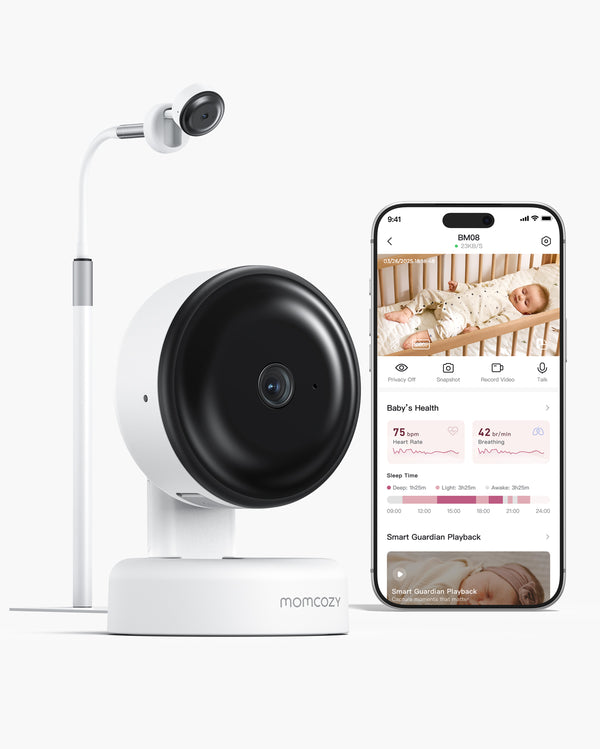
This is where things get genuinely useful. Momcozy Contact-Free Smart Baby Monitor BM08 uses contact-free sensing to provide breathing dynamics and sleep-related reports without socks, patches, or wearable sensors.
No Wearables Required
No Monthly Fees
Cry & Face Covering Notifications
2K Night Vision
No wearable also means nothing to charge, nothing to clip on, and nothing your baby can pull off in the middle of the night.
Sleep Summaries and Reports
When sleep-related information is combined with sleep summaries, it becomes more useful for daily routines. A monitor that shows when your baby falls asleep, wake moments, and sleep summaries can help you better understand nighttime patterns.
Over days and weeks, patterns emerge. That helps you adjust sleep schedules, refine feeding times, and notice changes in routine that may be worth paying attention to.
App Integration for Anywhere Access
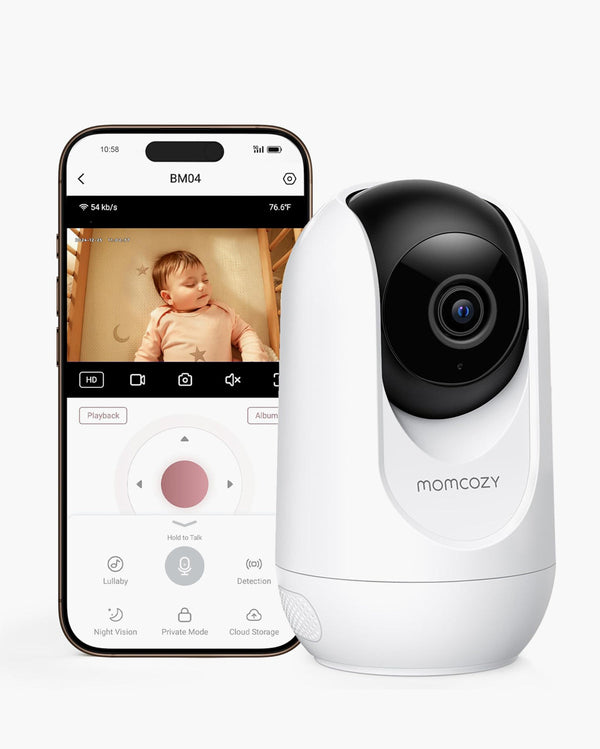
Remote access means you're not tied to a screen in the nursery. You can check in from the living room, your office, or a hotel room.
App connectivity also means push notifications reach you even when you're not watching the feed. You'll get smart notifications for sleep-related updates, movement, or a detected cry wherever you are.
Account sharing with permission controls matters too. It lets a partner, grandparent, or caregiver stay in the loop without changing your privacy settings.
Extra Smart Functions That Support Daily Parenting
A few additions make daily life with a smart monitor noticeably easier.
Auto-soothing plays built-in white noise or lullabies the moment crying is detected. That can calm your baby before you even get out of bed.
Auto-capture takes photos or short clips when the monitor detects movement or notable activity, so you don't miss milestone moments you weren't in the room for.
A portable, flexible stand also travels well, so your setup works the same at home or in a hotel room.
Why Smart Features Matter to Parents
Everyday Sleep Check-In Support
AAP safe sleep guidelines recommend back-sleeping, but babies move and rolling happens as they develop. You can't watch all night. A monitor that sends meaningful notifications for sleep-related situations can help reduce unnecessary checking and support calmer nights.
Momcozy Contact-Free Smart Baby Monitor BM08 is designed to provide smart sleep-related notifications and everyday monitoring support, helping parents know when it may be time to check in.
Parent-Child Connection
Two-way audio is more than a safety tool. When your baby hears your voice through the monitor at night, it reinforces their sense that you're nearby. Small interactions like that support attachment and emotional security over time.
Sleep reports can help too.. Knowing your baby is in light sleep versus deep sleep helps you decide whether to give them a moment or respond right away. That's the kind of information that builds parenting intuition.
Peace of Mind and Confidence
Parenting confidence often comes down to information. When you can check in on your baby's sleep and receive smart notifications when the monitor notices sleep-related activity, you can let yourself rest.
That's what a smart monitor is really for. Not to have you watching a screen all night, but to keep watch for you.
A Truly Smart Monitor Should Also Be Safe
Secure and Encrypted Connections
Your nursery footage is private. Any smart monitor should protect it with end-to-end encryption. The industry standard is 256-bit AES.
Beyond encryption, look for:
- Privacy controls, such as a mode that disables camera and audio access when needed
- Per-user permission controls for anyone you share access with
-
Local storage options that keep footage off public cloud servers
Low-Emission and Baby-Safer Design
Millimeter-wave sensing runs at low power and is used in many everyday sensing applications. It does not work like a cellular signal.
For night vision, 940nm infrared light is completely invisible to the human eye and emits no visible glow. Older 850nm systems emit a faint red glow that 940nm technology avoids entirely.
Smart Technology Should Support, Not Replace, Parenting
A monitor does not replace being there. What it does is reduce the hours you spend anxiously watching a screen, so you can be more present when it counts.
A well-designed system stays quiet most of the time and responds quickly when it matters. That's the balance worth looking for.
What to Look for When Choosing a Smart Baby Monitor
Here's a quick summary of what a genuinely smart monitor should offer. Use it as a checklist when you're comparing options.
| Feature |
What to look for |
| Video quality |
2K HD for clear detail day and night |
| Night vision |
940nm IR, completely invisible, no sleep disruption |
| Breathing dynamics |
Contact-free sensing that provides sleep-related breathing dynamics
|
| Smart notifications |
AI-assisted notifications for meaningful activity, not every small movement
|
| App access |
Remote viewing, push notifications, account sharing |
| Encryption |
256-bit AES end-to-end with local storage option |
| Sleep reports |
Automatic stage logging with long-term trend data |
| Installation |
Flexible stand that works at home and while traveling |
Once you have a shortlist, here's how to evaluate what you're actually getting.
How to Judge Video and Connection Quality
Don't rely on specs alone. Check user reviews specifically about nighttime image quality and connection stability through walls. A monitor that drops signal or lags during playback will frustrate you regardless of its other features.
How to Tell If the Notification System Is Actually Smart
Ask one question: does this monitor notify you for everything, or does it help filter for meaningful moments? Look for published details about alert logic and customizable sensitivity settings. Those are signs the system was designed to reduce noise, not just maximize notifications.
How to Evaluate the App Before You Buy
Download the app before purchasing if possible. Check recent reviews for complaints about connectivity drops or cluttered interfaces. An app that's unreliable or hard to navigate makes the whole monitor harder to use every day.
What to Verify About Safety and Privacy
Read the privacy policy, not just the product page. Confirm where video data is stored, who can access it, and whether the company offers local storage. The best baby monitors are upfront about this and put control in your hands.
Find a Monitor That Does the Work for You
A smart baby monitor is not about the longest spec list. It's about fewer nights of anxious watching and more nights of actual sleep. The right one helps you check what matters, sends smart notifications when needed, and stays out of the way the rest of the time.
Momcozy Contact-Free Smart Baby Monitor BM08 was designed with that in mind: contact free detection and sleep reports, breathing dynamics, smart notifications, 2K HD night vision, and full encryption, with no subscription required. Find yours and see what fits your family best.
FAQ about Smart Baby Monitor Essentials
Q1: Do smart baby monitors require a monthly subscription?
Not always. Some brands gate health advanced sleep reports behind a recurring fee. Others include core features with a one-time purchase. Before buying, check exactly which features require a subscription and whether the free tier is actually useful day-to-day.
Q2: What do contact-free breathing dynamics mean?
Breathing dynamics refer to contact-free sleep-related reports that help parents better understand movement patterns during sleep. They are not medical measurements and should not replace professional medical monitoring or advice.
Q3: Can contact-free sensing work when a baby shifts under a blanket?
Contact-free sensing may help capture sleep-related movement patterns without wearables, but it should not be treated as medical breathing detection. Always follow safe sleep guidance and use the monitor as everyday home monitoring support.
Q4: How do I know if a baby monitor is safe to use in the nursery?
Look for 256-bit AES end-to-end encryption, a Privacy Mode that cuts recording instantly, and a clear data storage policy. Momcozy Contact-Free Smart Baby Monitor BM08 is designed for everyday home baby monitoring support and is not a medical device. Skip monitors from brands that don't publish their security documentation.
Q5: At what age can I stop using a baby monitor?
It varies by family. Most parents use a monitor through the first one to two years, especially while parents still want regular nighttime check-ins. As children get more mobile and verbal, typically around age two to three, most families scale back naturally. There's no hard cutoff.