MEDICALLY REVIEWED BY
Shelly Umstot, BSN, RN
Shelly Umstot is a BSN and has been a registered nurse for over 35 years. She lives in North East Ohio and is a freelance health content writer. Her passion is bringing understanding to those with questions and concerns regarding health issues and helping them obtain and maintain their optimal health. She loves being with her family and has two lovely granddaughters who have stolen her heart. Assisting new parents in finding the information they need to face the joys and challenges of caring for their children is a gratifying experience for her as a professional, parent, and grandparent herself.
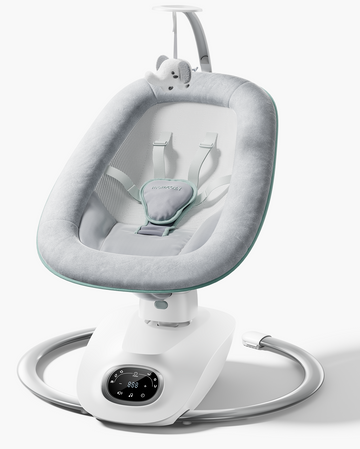
An app-connected swing may give you a more organized record of soothing sessions—if the exact product and app document that function. That record may help you notice patterns, but it should be checked against what you observe. It cannot confirm that a baby is asleep, interpret a baby’s health, replace adult supervision, or replace safe-sleep practices.
The useful question is not, “Will this app tell me why my baby will not sleep?” It is, “Will this make it easier for me to notice and test a few everyday soothing patterns without creating more screens, alerts, or worry?”
Start With the Exact Model, Not the Category Label
“Connected” does not describe one standard set of features. A swing may have an app for setup or controls, while another may log sessions or offer notifications. Do not assume that an app-connected swing records crying, motion duration, selected settings, sound, sleep, caregiver notes, or biometric information unless the manufacturer documents those functions for that exact model.

Before relying on any data, check the current product manual, app-store listing, privacy policy, and support pages. Look for clear answers to three different questions:
Type of information |
What it might mean |
What it does not prove |
|---|---|---|
Device-recorded activity |
A session began or ended, or a setting was selected |
The baby settled because of that setting |
App-generated estimate or score |
Software has identified a pattern from its available inputs |
That the baby was asleep, in a particular sleep stage, or medically well |
Your observations |
What you saw before, during, and after soothing |
A diagnosis or a guaranteed prediction for the next session |
A quiet or still baby is not automatically a sleeping baby. And if an app labels a period “sleep,” treat that as an estimate unless the manufacturer explains exactly how the label is generated and what it has been validated to mean.
Use a Log to Test Patterns, Not to Read Your Baby’s Mind
The practical value of tracking is often modest but real: repeated soothing attempts can blur together, especially when more than one caregiver is involved. A short record can help you notice what tends to coincide with easier calming.
You do not need a connected product to do this. A phone note, paper log, or shared family document can work just as well.
For several awake, supervised soothing sessions, record:

- Start time: When did fussiness begin, or when did you start the session?
- Visible cues: Was the baby alert, turning away, crying, rubbing their face, calm, or escalating?
- Context: Had the baby recently been fed, changed, or spent time in a busy environment?
- What you tried: Note the selected setting only if the product documents it, along with room conditions such as light or sound.
- What happened: Did the baby become calmer, stay alert, become more upset, or fall asleep?
After a few days, look for tentative patterns rather than rules. You might notice that soothing seems easier at a particular time of day, after a feeding, or when the room is quieter. That is a hypothesis to test—not proof that one motion, sound, or schedule is the answer.
A useful next step is to maintain a single condition for a few sessions while responding to the baby’s real-time cues. If a routine is not helping, stop treating the log as a scorecard and adjust.
Keep Awake Soothing Separate From Sleep Decisions
An app, automatic shutoff, remote control, or notification does not provide supervision. It also does not make a product an appropriate sleep space.
The safety decision comes before the data decision:
Use a swing only according to the exact manufacturer’s current instructions, including its age, weight, positioning, harness, supervision, and discontinuation limits. Do not let an app notification or session log substitute for checking on your baby.
If a baby falls asleep during a soothing session, follow current safe-sleep guidance and the manufacturer’s instructions rather than relying on the app to tell you what to do next. The FDA has emphasized that infant monitors are not replacements for adult supervision or safe-sleep practices. It's warning on unauthorized infant monitors also noted that no device has been authorized to prevent sudden unexpected infant death or sudden infant death syndrome.

That warning concerns unauthorized devices that monitor vital signs, not ordinary swing apps. Still, its central boundary is relevant: technology can offer information or convenience, but it cannot take over a caregiver’s safety decisions.
Convenience Features Have Failure Modes
If a particular swing offers app controls or notifications, assess them as convenience features—not as safety features or evidence of sleep quality.
Connected baby technology can create friction when a phone, account, home network, Bluetooth connection, or app update does not work as expected. In a study of consumer reviews of infant sleep-monitoring products—not swings—32.2% of coded reviews described device-performance problems, and 6.9% described stopping use. Those findings cannot show how often a swing app will fail, but they are a useful reminder to test any connected product before depending on it during a difficult moment. The consumer-review study cannot verify device accuracy or establish clinical diagnoses.
Before regular use, try a simple household test:

- Confirm whether the product still works safely if the phone is unavailable.
- Check whether the app reconnects after Wi-Fi, Bluetooth, or power interruptions.
- Learn how controls work directly on the product.
- Decide which notifications are genuinely useful and turn off those that create noise.
- Make sure every caregiver knows the basic instructions without needing access to your account.
If an app creates more checking, more alerts, or more uncertainty than it resolves, a low-tech log may be the better fit.
A Purchase Checklist for Privacy, Cost, and Safety
A connected model is worth considering only when its verified features solve a problem you actually have. Before purchasing, answer “yes” to these questions.
Function and usability
- Does the manual clearly state what the app can and cannot do?
- Can the product be used safely and as intended without the app?
- Are controls available on the swing itself?
- Does the app require a particular phone, operating system, Wi-Fi connection, account, or paid plan?
- Are any advertised logs, alerts, or settings available in your country and app version?
Privacy and account control
- What information does the privacy policy say the app collects?
- Does it involve account details, device information, usage history, audio, video, or location?
- Where is information stored, and does the policy describe sharing with service providers or other third parties?
- Can you delete the account and request deletion of stored information?
- Can you secure the account with a strong, unique password and enable the available account security options?
Product limits and current safety information
- Have you read the exact model’s age, weight, harness, positioning, supervision, and discontinuation instructions?
- Have you checked the manufacturer’s current recall page?
- Have you searched the official CPSC recall information for the product name and model number?
- Will you recheck for recalls or safety notices after purchase?
The absence of a recall in a quick search is not proof that no recall or warning exists. Product information, app permissions, pricing, and policies can change, so check them immediately before buying and periodically afterward.
A non-connected swing—or no swing at all—can still fit a thoughtful, soothing routine. The same five-item caregiver log can reveal useful patterns without a subscription, account, notifications, or data-sharing questions.
Smart features are best treated as optional organization tools, not parenting authority. Choose a connected swing only if its documented functions, safety instructions, privacy terms, and ongoing cost work for your household—and let your baby’s real-time cues and current safe-sleep guidance lead every decision.