Every baby monitor on the market calls itself smart. But if you've dismissed the same motion notification three times in an hour, or squinted at grainy footage trying to figure out your baby's sleep position, you already know "smart" can mean a lot of different things depending on the product.
That's because smart baby monitor features aren't one thing. They're a mix of connectivity, sensing, and software working together, and products vary widely in how well each layer actually performs. Before comparing specific baby monitors, it helps to judge "smart" by what information actually changes what you do, not by how long the feature list is on the box.
This guide breaks the smart monitor category into what actually makes it work: connectivity, sensing, and software interpretation. It explains what each alert can and can't tell you, where the medical boundary sits, and how to match a monitoring style to your family's routine instead of chasing the longest spec sheet.
Key Takeaways
- A smart baby monitor is a stack of connectivity, sensing, and software, not one feature or a promise of greater safety.
- Cry, motion, face-covering, sleep, and breathing-related signals detect or infer different things and shouldn't be treated as interchangeable.
- Smart features only help if the core video, audio, connection, and alerts stay dependable night after night.
- App-only, dedicated-screen, and dual-mode systems create different caregiver workflows, so viewing method is its own decision.
- Contact-free sensing reduces setup friction compared to a wearable, but it isn't medical monitoring by default.
- Subscription terms, encryption, storage, and outage behavior deserve the same scrutiny as any headline feature.
What Makes a Baby Monitor "Smart"?

"Smart" should mean a monitor actively processes what it detects and does something useful with that information, not just streams footage to your phone. If a device just shows video and beeps at every sound, that's a camera with a speaker, not a smart monitor. The label isn't a regulated category, so the underlying stack varies widely between products. The clearest way to evaluate it is to look at three layers separately.
Connectivity
How the monitor gets video and data to you: Wi-Fi and an app, a dedicated local screen, or both. This determines remote access and how dependent the monitor is on your home network.
Sensing
What the device actually detects: sound, motion, video, or in more advanced products, contact-free or wearable sensing tied to sleep-related movement.
Software and Interpretation
What happens after detection: how raw sensor data becomes a filtered notification, a summary, or a trend you can review later. More software can add useful context, but it also adds dependencies, notification volume, and sometimes ongoing cost.
Smart Is a Stack: Connectivity + Sensing + Software
Two monitors can list nearly identical features while working completely differently underneath. Comparing the stack, rather than the label, makes the differences clear.
|
Layer |
Common Options |
What It Affects |
|
Connectivity |
Wi-Fi and app, local non-Wi-Fi, or dual-mode |
Remote access, setup complexity, dependence on home internet |
|
Sensing |
Camera and audio events, contact-free sensing, wearable sensors |
What data exists to interpret in the first place |
|
Software |
AI-filtered notifications, event history, sleep summaries |
How raw detections become something you can act on |
|
Viewing |
Phone app, dedicated parent unit, or both |
Where and how you actually check in |
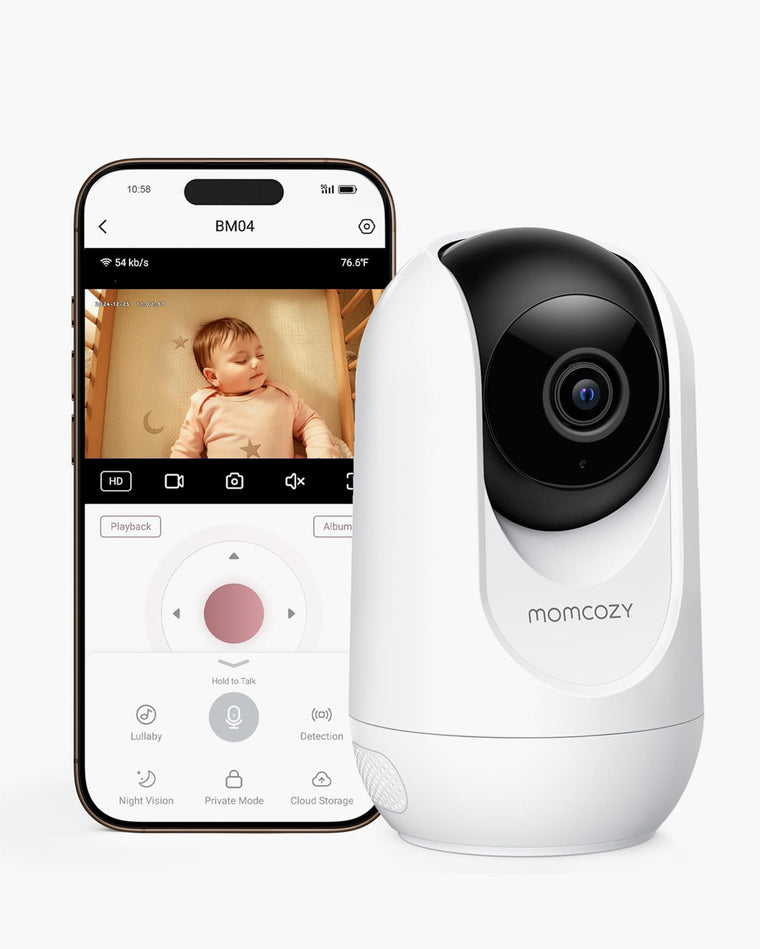
Video quality and night vision sit inside the sensing layer and are worth checking closely. 2K HD resolution shows meaningfully more detail than standard 1080p, letting you see sleep position and expression clearly rather than a vague shape.
For night vision, 940nm infrared is invisible to the human eye and won't disturb sleep, unlike older 850nm systems that emit a faint red glow. A zoom function and low-latency two-way audio round out this layer, letting you respond to stirring before it becomes full crying without walking into the nursery.
What Each Smart Alert Actually Tells You
"AI," "smart alerts," and "sleep insights" get used loosely, and they don't all mean the same thing. The clearest way to judge any alert is to ask what it detects, how it's detected, what you actually see, what it can help with, and what it does not mean.
|
Signal |
How It's Detected |
What You See |
What It Can Help With |
What It Does NOT Mean |
|
Cry or sound |
Audio sensing with AI filtering for real crying versus background noise |
Push notification |
Responding before a whimper becomes full crying, without alert fatigue from every household sound |
It doesn't identify the cause of crying |
|
Motion |
Camera-based detection, AI-filtered to distinguish normal shifting from notable events like rolling face-down |
Push notification |
Prompting a check-in for a sleep-related situation worth attention |
It's not a measure of sleep quality on its own |
|
Face covering or rollover |
Camera-based position detection relative to bedding |
Immediate alert |
Prompting a parent to check positioning |
It doesn't guarantee the alert triggers every time, and doesn't replace safe-sleep setup |
|
Sleep summary or pattern |
Software aggregates motion and sound data over time, including sleep stage and wake-moment logging |
Daily or weekly summary in the app |
Spotting routine trends over days or weeks, useful for adjusting schedules or feeding times |
It's not a clinical sleep study and can miss short wake-ups |
|
Breathing dynamics |
Contact-free sensing infers movement patterns associated with breathing during sleep |
Trend or notification in the app |
Adding one more data point to a nightly routine |
It is not a medical measurement and should not replace professional medical monitoring |
Direct Event Detection
Cry, motion, and face-covering alerts are the closest thing to real time. They're tied to a single detected event, which makes them useful for immediate check-ins but not for judging a whole night at once.
Pattern Summaries
Sleep summaries are software's interpretation of many data points over time. They're useful for spotting trends across days or weeks but can smooth over short, meaningful events a direct alert would have caught.
Physiological-Style Signals
Breathing dynamics sit apart from the rest. How a specific product actually generates this data, and its limits, should be verified against that product's current documentation before you rely on the language around it.
Detection, Insight, and Medical Monitoring Are Not the Same Thing

AAP safe sleep guidance recommends back-sleeping, but babies move and rolling happens naturally as they develop, and no parent can watch all night. A monitor that sends meaningful notifications for sleep-related situations, like rolling face-down, can help reduce unnecessary checking and support calmer nights.
Breathing dynamics and other sleep-related reports are consumer information, not medical measurements. They should not replace professional medical monitoring or advice, and they don't substitute for following safe-sleep guidance.
If a pediatrician has recommended monitoring for a specific medical reason, that guidance should be followed on its own, separately from any consumer smart-monitor feature.
How Do You Want to Check In: Phone, Parent Unit, or Both?

The viewing method is its own decision, separate from sensing. Each option changes how you check in day to day, not just what the monitor can detect.
App-First
App integration means you're not tied to a screen in the nursery. You can check in from the living room, the office, or a hotel room, and push notifications reach you even when you're not actively watching the feed. Account sharing with permission controls lets a partner, grandparent, or caregiver stay in the loop without changing your own privacy settings.
Dedicated Parent Unit
A local display gives always-on viewing without needing a phone at all, which some caregivers prefer specifically to avoid notifications and distractions overnight.
Dual-Mode
Combines a local screen with optional app access, so you're not forced to choose one workflow over the other.
For a full walkthrough of app setup, parent-unit pairing, and troubleshooting, see the baby monitor app and parent unit guide.
Wearable vs. Contact-Free Sensing: What Changes in Daily Use?
Some smart monitors gather sensing data through something the baby wears, like a sock or patch. Others use contact-free sensing, such as millimeter-wave technology placed near the crib instead. Millimeter-wave sensing runs at low power and is used in many everyday sensing applications; it doesn't work like a cellular signal and doesn't require anything on or near your baby's body.
Daily Setup
Wearable: something to charge, clip on, or put on your baby each night. Contact-free: no daily setup on the baby, though placement still needs to be correct.
Comfort / Physical Contact
Wearable: direct body contact, which some products use to capture specific signal types. Contact-free: nothing on the baby to pull off or feel.
Interpretation Limits
Both methods produce consumer-grade data that should be read as everyday context, not as a medical-grade reading, regardless of which sensing method is used.
Neither approach is universally better; they trade different kinds of setup friction for different data types. For a deeper comparison, see this guide to contact-free baby monitors.
Do Smart Features Require a Subscription?
Subscription structures vary by product and sometimes by feature within the same product. Some monitors gate advanced sleep reports behind a recurring fee; others include core features, and even breathing dynamics or sleep summaries, with a one-time purchase and no monthly fee.
Before buying, ask exactly which features require a subscription, what happens once an included trial ends, and whether the free tier is actually useful for daily routines. That's a cost question as much as a feature question, and it deserves the same attention as picture quality or sensing method.
For a full breakdown of free versus paid features and total ownership cost across smart monitors, see the dedicated subscription guide (link to be added once published).
Reliability Comes Before Intelligence
None of the above matters if the core feed isn't dependable. Smart features are only as good as the connection carrying them.
Core Feed First
Don't rely on spec sheets alone. Check for user feedback specifically about nighttime image quality and connection stability through walls; a monitor that drops signal or lags will frustrate you regardless of its other features.
Alerts Need to Be Useful, Not Merely Frequent
The real question isn't whether a monitor sends alerts, but whether it filters for meaningful moments instead of buzzing at every small shift. Look for published details about alert logic and customizable sensitivity settings, since those are signs a system was designed to reduce noise. Too many low-value pings and parents start ignoring alerts altogether, which defeats the purpose of having them.
For a full look at Wi-Fi, non-Wi-Fi, and dual-mode reliability, see the baby monitor reliability guide.
Privacy, Security, and Storage Questions to Ask
Any monitor with remote or app-based access raises questions a purely local device doesn't. Before buying, ask:
- Does video ever leave the home network, and if so, where is it stored?
- Is there end-to-end encryption, with 256-bit AES as the industry standard?
- Is there a Privacy Mode that can disable camera and audio access instantly?
- Are there per-user permission controls for anyone you share access with?
- Is a local storage option available, so footage isn't only on public cloud servers?
- What still works if the internet connection goes down?
Reading the privacy policy, not just the product page, is worth the few minutes it takes. For a full explanation of the security mechanisms behind connected monitors, see the Wi-Fi baby monitor security guide.
Before You Buy: Smart Baby Monitor Checklist
Once you understand the stack, use this as a quick reference before comparing specific models. It covers the same layers discussed above: connectivity, sensing, software, and the buying variables that don't show up on a spec sheet.
|
Item |
What to Look For |
|
Connection requirement |
Wi-Fi, local non-Wi-Fi, or dual-mode, and what your home network needs to support |
|
Viewing method |
Phone app, dedicated parent unit, or both |
|
Camera placement |
Mounting options and recommended distance from the crib |
|
Power source |
Corded, battery backup, or both, and how outages are handled |
|
Phone compatibility |
Supported operating systems and number of paired devices |
|
Notification controls |
Whether alert sensitivity and notification types can be customized |
|
Recording and history |
Whether events are saved, and for how long |
|
Storage |
Local storage option versus cloud-only, and where footage lives |
|
Multi-camera support |
Whether the app or parent unit can handle more than one camera |
Once you have a shortlist, download the app before buying if possible, and check recent reviews for connectivity drops or a cluttered interface. From here, compare specific models in the baby monitor collection.
Which Smart Monitoring Style Fits Your Family?
The right fit depends on the job you want the monitor to do, not which product has the most features. Two families can buy the same monitor and use it completely differently, so it helps to start from your own routine rather than a spec comparison.
|
Path |
Best For |
|
Smart insights / contact-free sensing |
Parents who want added context on sleep and movement patterns and are comfortable with contact-free sensing |
|
App + parent unit / dual-mode |
Households juggling multiple caregivers across different locations |
|
Privacy-first local non-Wi-Fi |
Parents most concerned with privacy and cloud dependence |
|
Multi-room / multi-camera local monitoring |
Larger households or families with more than one child |
Choose by Monitoring Job
If the priority is understanding sleep and movement patterns over time, contact-free sensing adds the most relevant data.
Choose by Caregiver Workflow
If multiple people need to check in from different places, app access or dual-mode matters more than sensing depth.
Choose by Tolerance for Data and Recurring Services
If the priority is a simple, private, dependable feed with minimal cloud dependence or ongoing cost, a local non-Wi-Fi setup is often the better fit.
None of these paths is universally correct. Momcozy's range spans smart contact-free, dual-mode, and local non-Wi-Fi options because different households prioritize different things.
Frequently Asked Questions
Do all smart baby monitors need Wi-Fi?
No. Some smart features run on local, non-Wi-Fi connections, while others need Wi-Fi for app access or cloud-based history. Check the specific product's connection requirements before buying.
Is a smart baby monitor the same as a Wi-Fi baby monitor?
Not necessarily. Wi-Fi is one possible layer of a smart monitor, but sensing and software features can exist independently of how the video reaches your phone.
Can a smart baby monitor work without a subscription?
Some can. Many products keep core monitoring, and sometimes even sleep reports, free with a one-time purchase. Confirm this per product before buying.
Do I need a wearable for smart monitoring?
No. Contact-free sensing can provide similar categories of information without anything attached to the baby, though the two methods work differently.
What is the difference between a smart alert and a sleep insight?
An alert is typically tied to one detected event, like motion or sound. A sleep insight is a software summary built from many data points over time, useful for trends but less precise about any single moment.
Are breathing-related smart-monitor insights medical monitoring?
No. These are consumer-grade signals meant to add context, not to diagnose, treat, or replace equipment used under medical supervision. Speak with your pediatrician for any medical concern.
What happens to smart features if Wi-Fi goes down?
This depends on the product's architecture. Local or dual-mode systems may keep core monitoring working, while app-dependent features typically need an active connection. Verify this before relying on a monitor for remote access.
Is a dedicated parent unit still useful if I already have an app?
For many families, yes. A parent unit removes dependence on a phone and its notifications, which some caregivers prefer overnight even with app access available.
Conclusion
A smart baby monitor should reduce the hours you spend anxiously watching a screen, not add a longer list of things to compare. Understanding "smart" as a stack of connectivity, sensing, and software makes it much easier to see what any alert or insight actually offers, and just as importantly, what it doesn't. The goal isn't the monitor with the most data; it's the one that stays quiet most of the time and responds clearly when it matters. When you're ready to compare specific models, the full range is in the baby monitor collection.