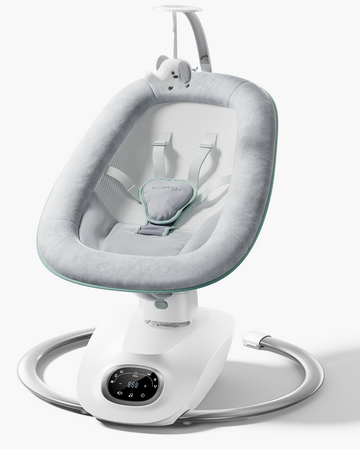
If your CocoSway will not power on, change motion, respond to the remote, or move as expected, start with the simplest checks first. This Momcozy CocoSway troubleshooting guide explains what may be happening, what you can safely check at home, and when to stop using the swing and contact support.
Key Takeaways
Most CocoSway problems can be narrowed down by checking the power supply, Type-C connection, timer, remote position, and swing path before changing anything else.
- CocoSway has 6 motion modes and 4 speed settings. Motion mode changes the movement pattern; speed changes how quickly the selected pattern runs.
- A mode icon may flash for about 9 seconds while the swing switches motions. The change is complete when the light stops flashing.
- The infrared remote should face the engine machine and stay within about 4 meters and the specified front-angle range.
- The seat rotates 180° total—90° to the left or 90° to the right. It is not designed to turn 360°.
- CocoSway is for supervised, awake soothing. If your baby falls asleep, move them as soon as possible to a firm, flat sleep surface such as a crib or bassinet.
Start Here: Choose Your CocoSway Issue
Use these jump links to go straight to the symptom you are seeing. Remove your baby before checking the frame, moving the seat, or restarting the swing.
|
Quick fix |
Quick fix |
|
CocoSway won't turn on |
Mode or speed is not changing |
|
Mode icon keeps flashing |
Swing stops after a while |
|
Motor protection mode |
Remote is not responding |
|
Swing makes noise |
Seat will not rotate 360° |
|
Seat angle is hard to adjust |
Harness or cushion looks wrong |
|
Toy bar is hard to remove |
Cleaning questions |
|
Baby seems too big |
Baby falls asleep |
Quick Checks Before You Troubleshoot
A two-minute inspection often solves an electric baby swing problem without disassembly. Take your baby out of the seat, turn the swing off, and work through these checks in order.
- Confirm that you are using the recommended 5V/2A power adapter and that the Type-C plug is fully inserted into the swing.
- Check the wall outlet, cord, plug, power adapter enclosure, and connection point. Do not use the swing if any electrical part is damaged.
- Clear the swing path. Blankets, hanging fabric, toys, nearby furniture, or a hand or foot can restrict motion.
- Check whether the selected timer or the 45-minute automatic stop has ended the session.
- For remote commands, stand within about 4 meters, point the infrared end toward the engine machine, and stay within the front-angle range.
- Do not rotate the seat, adjust its angle, move the swing, or lift the unit while your baby is in it.
For complete assembly and control instructions, see How to Use the Momcozy CocoSway 3D Motion Electric Baby Swing. You can also review general baby swing usage basics before the first session.
Stop here if something is damaged. Do not troubleshoot a frayed cord, cracked power adapter, broken buckle, loose structural part, or damaged frame by continuing to operate the swing. Use only approved parts and the recommended power adapter.
CocoSway Won't Turn On
When the CocoSway shows no lights or response, the problem is usually somewhere in the power path rather than the motion setting.
Possible cause. The Type-C plug may be loose, the adapter may not be connected to power, the outlet may not work, or the adapter or cable may be damaged. An adapter that does not match the recommended 5V/2A input can also prevent correct operation.
How to fix it. Remove your baby, disconnect power, and firmly reconnect the Type-C cable at the right side of the main unit. Reconnect the power adapter at the wall, then test a known-working outlet. Inspect every visible part of the cord, plug, and power adapter before pressing the power control once to enter standby.
If the unit still will not start, compare the connection with the official CocoSway user manual or check the Momcozy CocoSway product page for current support information.
Safety note: Stop using the swing if the cord, plug, power adapter, or product enclosure is damaged. Do not try an unapproved adapter, splice a cable, or modify the power input.
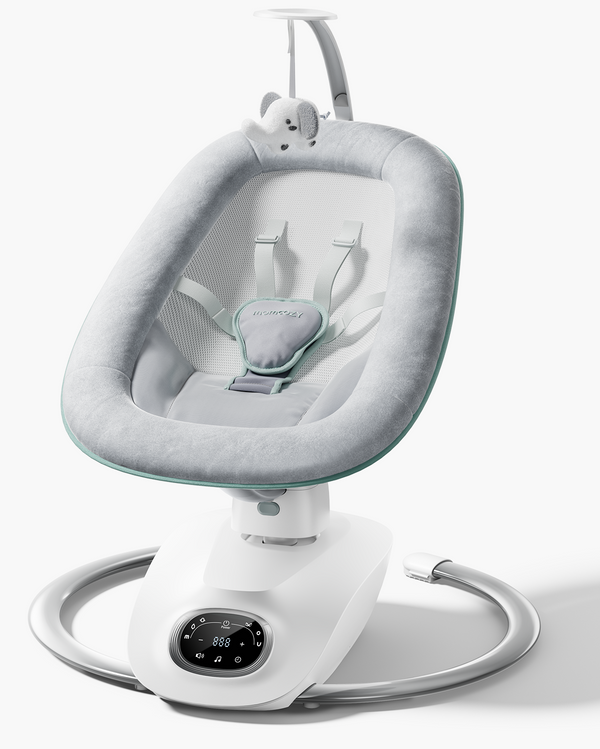
Member price
$183.99$229.99
Swing Mode or Speed Is Not Changing
Mode and speed are separate controls on CocoSway, so first identify which setting is not responding. The swing provides 6 motion patterns and 4 speed levels.
Possible cause. The unit may still be in standby, a mode transition may be processing, or the wrong control may be pressed. At speed 4, pressing speed "+" again has no effect. At speed 1, pressing speed "−" again stops the swinging motion according to the AW01 manual.
How to fix it. Power on the unit, start a swing mode, and wait for any flashing mode icon to become steady. Use the mode control to change the movement pattern. Use speed "+" or "−" only after the selected mode is running, then pause briefly so the mechanism can respond.
Think of motion mode as the path—such as left-to-right or a combined three-dimensional pattern—and speed as the pace along that path. If you are comparing how CocoSway's motion differs from another model, see the 2-in-1 vs. 3D motion baby swing comparison.
Mode Icon Keeps Flashing
A flashing motion symbol during a mode change is normally a transition signal, not proof that the swing is defective.
What is normal. The AW01 manual says the screen symbol may flash for about 9 seconds while CocoSway switches between motion modes. When the light stops flashing, the change is complete.
How to fix unusual flashing. Wait for the transition to finish without pushing the seat. If the icon continues flashing well beyond the normal interval or motion does not resume, turn the power off, remove anything touching the seat or movement path, verify the Type-C connection, and restart the swing.
Safety note: Never force the seat through a motion pattern by hand. If prolonged flashing returns after a clear-path restart, stop using the swing and contact Momcozy support.
Swing Stops After a While
A swing that stops after running normally may have reached its timer limit or automatic stopping point rather than losing power.
Possible cause. The selected countdown may have ended, the 45-minute automatic stop may have been reached after no further operation, or motor protection may have activated because movement was restricted.
How to fix it. Check the timer display, then restart a supervised session only if the swing path is completely clear. The current AW01 user manual lists timer settings of 15, 30, 45, 60, and 90 minutes. If the controls supplied with your unit show different intervals, follow the manual packaged with that unit.
An automatic stop is a cue to check your baby and the product—not a reason to extend sleep in the seat. If your baby has fallen asleep, move them to a crib, bassinet, or another firm, flat sleep surface.

Swing Stops or Enters Motor Protection Mode
CocoSway includes a motor-protection response that stops the swing, music, and timer when the program detects that an outside force is blocking motion.
Possible cause. A blanket, toy, piece of furniture, loose fabric, or other object may be touching the seat or frame. The seat may also be restricted because the swing is too close to a wall or another item.
How to fix it. Remove your baby, turn off power, and unplug the unit. Clear the entire movement area, including under and behind the seat. Reconnect power, restart, and watch one short cycle from a safe distance. Normal movement should return if the obstruction was the cause.
Safety note: Do not push, pull, or force the mechanism by hand. If protection mode repeats with a clear swing path, stop using the product and contact support.
Remote Control Is Not Responding
The CocoSway remote uses infrared control, so distance, direction, angle, and battery setup all matter.
Possible cause. The battery isolation film may still be in place, the remote may be too far away, or its infrared end may not face the engine machine. A loose, depleted, or incorrectly installed CR2025 battery can also prevent a response.
How to fix it. Before first use, pull the isolation film from the battery compartment. Hold the remote facing up, point the infrared end toward the engine machine, and operate it within about 4 meters. The manual specifies an effective range within 35° on either side of the front of the engine. If needed, securely install a compatible 3V CR2025 battery with the correct polarity.
Button-cell battery warning: New and used coin batteries must stay out of children's reach. A swallowed battery can cause severe internal injury. If ingestion or insertion is suspected, seek immediate medical attention. If the battery compartment will not close securely, stop using the remote, remove the battery, and keep it away from children.
Swing Makes Noise in Certain Modes
Some sound variation can occur because CocoSway's six modes use different movement paths, and customer feedback about motor sound varies by mode. A new loud, grinding, or irregular noise should not be treated as normal.
Possible cause. A base screw may need rechecking, a bottom tube or seat-support adapter may be loose, or the backrest frame may not be fully clicked into place. The toy bar, seat fabric, or a nearby object may also rub during part of a motion cycle.
How to fix it. Remove your baby, power off, and inspect all assembly points from the setup guide. Confirm that the four base screws are secure, the bottom tubes do not wobble, the seat-support adapter and backrest frame are fully engaged, and the seat-cover zippers and rear webbing buckle are correctly fastened. Clear rubbing fabric or objects, then test the left-to-right mode separately to help isolate whether the sound occurs in one pattern or all modes.
Safety note: Stop using the swing and contact support if the sound is loud, grinding, irregular, or accompanied by wobbling, jerking, looseness, or unstable movement.
Seat Does Not Rotate 360 Degrees
The seat is working within specification if it stops after a quarter-turn in either direction. CocoSway offers 180° total rotation, not full 360° rotation.
How to adjust it. Remove your baby first. Hold the seat securely with both hands and rotate it up to 90° left or 90° right from the center position. Stop when it reaches the designed limit.
Safety note: Do not force the seat beyond 90° in either direction. Forcing a 360° turn may damage the product.

Seat Angle Is Hard to Adjust
CocoSway's seat angle adjusts only within its designed recline range, and the locking handle must be released before the seat will move.
Possible cause. The handle may still be locked, the user may be trying to adjust the seat with the baby inside, or the seat may already be at the upper or lower limit.
How to fix it. Take your baby out of the swing. Pull up the handle on the engine machine, adjust the seat between 15° and 28°, and pull the handle down to lock the chosen position. Confirm that the seat is secure before placing your baby back in it.
Safety note: Never adjust the backrest or seat angle while a child is in the swing. Keep the seat fully reclined until the infant is at least 4 months old and can hold their head up without help, as directed in the manual.
Harness or Seat Cushion Looks Incorrect
If the straps appear twisted, uneven, or too high or low, check how they pass through the seat cushion before placing your baby in the swing.
Possible cause. A shoulder strap may be routed through the wrong row, the waist and shoulder buckles may not be paired correctly, the crotch buckle may not be fully engaged, or the cushion may not be seated properly.
How to fix it. Use the upper shoulder-strap row for a larger baby and the lower row for a smaller baby, based on fit. Route both shoulder straps and the crotch strap through their corresponding cushion openings. Connect each shoulder buckle to its matching waist-belt buckle, insert both sides into the crotch buckle, and stick the Velcro cover over the crotch buckle.
Safety note: Always use the complete 5-point harness and adjust it so it fits snugly. Do not use the swing if a strap, buckle, or attachment point is damaged, missing, or will not lock.
Toy Bar Feels Hard to Remove
Resistance after installation may be expected because the toy bar is designed to fit into the groove at the top of the seat and may not come out easily once fixed.
Do not pry, twist, or improvise a removal method that could damage the seat. If the toy bar must be removed and the correct release method is unclear, refer to the CocoSway setup guide or contact Momcozy support for product-specific instructions.
Safety note: Never use the toy bar as a carrying handle. Do not lift or move the product with your baby in the seat.
Cleaning Questions: What Can and Cannot Be Washed
The seat cover is machine-washable, but the toy bar, toys, frame, and adapter require different care. Always disconnect power and remove the seat cover before cleaning.
|
Part |
Correct cleaning method |
Do not |
|
Seat pad |
Remove from frame; machine wash cold on a gentle cycle; tumble dry on low heat |
Do not bleach |
|
Toy bar and toys |
Wipe with a damp cloth and mild soap; air dry |
Do not immerse in water |
|
Metal frame |
Wipe with a soft, clean cloth and mild soap |
Do not soak or use harsh cleaners |
|
Power adapter |
Wipe only with a dry cloth |
Do not wash |
Let every part dry fully before reassembly and use. For removal and refitting steps, follow How to Use the Momcozy CocoSway 3D Motion Electric Baby Swing.

Baby Seems Too Big for the Swing
Fit is not judged by appearance alone. The product limit and your baby's developmental stage both determine when CocoSway use should end.
The AW01 manual identifies a standard load of 9 kg (about 20 lb) and a suitable age range of 0–6 months. It also says to stop when an infant attempts to climb out. Stop sooner if your baby can sit up, tries to climb out, exceeds the stated limit, cannot be positioned securely, or is no longer properly supported by the seat and harness.
Because development varies, do not wait for a birthday or weight milestone if safe use has already changed. Review the signs for when to stop using a baby swing and follow the earliest stop-use condition that applies.
Baby Falls Asleep in the Swing
This is a safe-sleep action, not a mechanical problem to troubleshoot. CocoSway is intended for supervised soothing while your baby is awake.
If your baby falls asleep, move them as soon as possible to a crib or bassinet with a firm, flat mattress and fitted sheet, placed on their back. The American Academy of Pediatrics' safe sleep guidance advises against sleep in seating devices such as swings, and the U.S. Consumer Product Safety Commission recommends a flat, bare sleep space without pillows, blankets, or toys.
For a fuller explanation of positioning, supervision, and sleep boundaries, read Momcozy's guide to safe baby swing use.
When to Contact Momcozy Support
Contact support when basic checks do not restore normal function or when any electrical, restraint, or structural part may be unsafe.
- The unit will not power on after you verify the 5V/2A power adapter, Type-C connection, and outlet.
- The remote still does not respond after you remove the isolation film and check direction, range, angle, and battery installation.
- The swing stops repeatedly even though the full movement path is clear.
- Seat rotation or recline feels stuck within its intended range.
- The frame, base, seat-support adapter, or backrest remains loose after assembly checks.
- A harness, buckle, power component, or structural part is damaged, missing, or will not secure.
- The swing makes a loud, grinding, irregular noise or moves unstably.
Have the model name AW01, proof of purchase, and a clear description or short video of the symptom ready. Visit the official CocoSway user manual and support page or email support@momcozy.com. Do not substitute parts or continue using a damaged product while waiting for help.
Related Guides
These links answer the next questions that often come up after troubleshooting, from correct setup to choosing or retiring a swing.
-
How to Use the Momcozy CocoSway 3D Motion Electric Baby Swing
- Explore the Momcozy baby swing collection
-
View the Momcozy CocoSway 3D Motion Electric Baby Swing
-
Are Baby Swings Safe? What Parents Need to Know
-
When to Stop Using a Baby Swing
-
How to Use Baby Swings
- Choose a Baby Swing Safely and Smart
-
Baby Swing Comparison: 2-in-1 vs. 3D Motion
FAQ About Momcozy CocoSway Troubleshooting
These quick answers cover the most common support searches. Use the detailed sections above when you need step-by-step checks.
Why won't my Momcozy CocoSway turn on?
Check the recommended 5V/2A power adapter, Type-C connection, wall outlet, and power control. Stop using the product if the cord, plug, power adapter, or enclosure is damaged.
Why does the swing mode icon flash?
The icon may flash for about 9 seconds while the swing changes modes. Wait until it stops before deciding whether the new motion has started. If flashing continues unusually long, clear the motion path and restart.
Why did CocoSway stop swinging?
The selected timer or 45-minute automatic stop may have ended the session, or motor protection may have activated after movement was blocked. Remove your baby, turn off power, clear the path, and restart only if nothing is damaged.
Why is my CocoSway remote not working?
Remove the battery isolation film, point the infrared end toward the engine machine, stay within about 4 meters and the specified front angle, and check the CR2025 battery and polarity.
Can the CocoSway seat rotate 360 degrees?
No. It rotates 180° total—90° to the left or 90° to the right. Do not force it farther.
Can babies sleep in the CocoSway baby swing?
No. Use CocoSway for supervised, awake soothing. If your baby falls asleep, move them as soon as possible to a firm, flat sleep surface such as a crib or bassinet.
Can I machine-wash the CocoSway seat cover?
Yes. Remove it from the frame, machine wash cold on a gentle cycle, do not bleach, and tumble dry on low. Wipe the toy bar and toys with mild soap and a damp cloth; do not immerse them.
When should I stop using CocoSway?
Stop when your baby reaches any manual stop-use condition, including exceeding 9 kg (about 20 lb) or trying to climb out. Also stop if your baby can sit up, no longer fits securely, or cannot be correctly supported and restrained.
Get CocoSway Moving Safely Again
Effective Momcozy CocoSway troubleshooting starts with power, a clear motion path, correct remote alignment, and the product's designed limits. If a safe restart does not solve the issue—or any part looks damaged—stop using the swing and contact Momcozy. For model details, support access, or a replacement comparison, visit the CocoSway product page or browse the Momcozy baby swing collection.