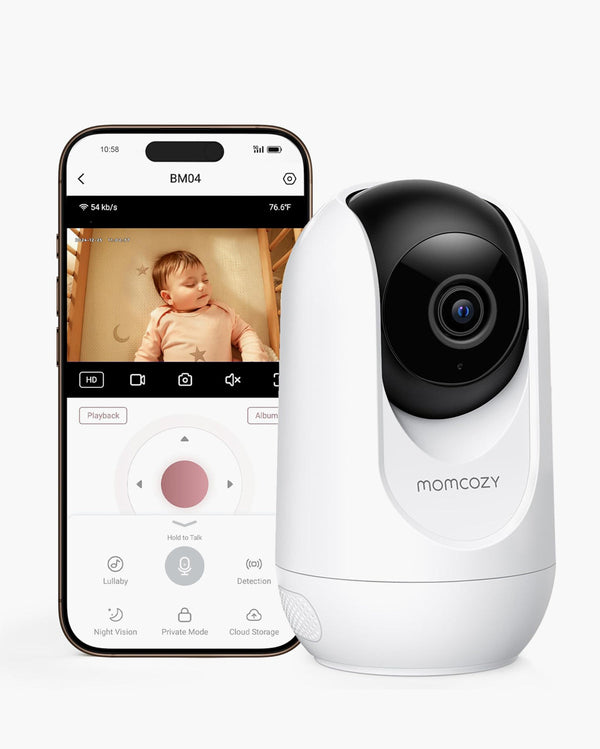
For modern parents, our smartphones are our lifelines. When preparing a nursery, it is entirely natural to look for a baby monitor that connects to phone. The ability to pull out your device and instantly check on your little one—whether you are downstairs making dinner, back at the office, or out on a date night—offers valuable peace of mind.
The bottom line is simple: while relying solely on a repurposed phone as a makeshift monitor can drain your battery and drop connections, pairing your smartphone with a dedicated, app-connected smart monitor offers the perfect balance of convenience, caregiver sharing, and everyday nursery awareness. Ultimately, the best choice comes down to your home's WiFi reliability, your privacy preferences, and whether you prefer the flexibility of app-based check-ins, the simplicity of a traditional parent unit, or a dual-mode setup that offers both.
What Are Baby Monitor Apps and Connected Devices?
Before diving into the pros and cons, it is helpful to clearly define the categories. The term "baby monitor app" is often used broadly, but it generally refers to software that works alongside connected cameras or smart baby monitoring hardware, allowing parents to view video feeds, hear audio, and manage settings directly from a smartphone or tablet.
To make an informed choice, it is important to understand the different ways these technologies come together:
-
Standalone Phone Apps: These are software-only solutions where you repurpose two smartphones or tablets—one acts as the camera in the nursery, and the other serves as the viewer. While budget-friendly, they drain battery quickly and often suffer from connection drops.
-
WiFi Baby Monitors with App Viewing: These are purpose-built nursery cameras that connect to your home internet. You view the live feed and receive notifications exclusively through a dedicated companion app on your phone.
-
Dual-Mode Monitors: These versatile systems offer the best of both worlds. They include a traditional parent unit for local, non-WiFi viewing at home, but also connect to your home network, allowing you to use a smartphone app for remote viewing.
-
Traditional Parent-Unit Monitors: These setups do not use the internet or apps at all. A camera transmits a secure, local signal (often via FHSS technology) directly to a dedicated handheld screen.
Understanding these distinctions is the first step in building a reliable setup. If you are new to this technology and want a foundational overview of the different transmission types, you can explore how baby monitors work to get up to speed.
Can You Use a Smartphone as a Baby Monitor?
The short answer is yes: a smartphone can absolutely be used as part of your baby monitor setup when paired with a compatible, app-connected camera. For many families, the smartphone becomes the central hub for keeping an eye on the nursery.
However, while using your phone is incredibly convenient, it comes with realistic limits that parents should consider before making it their only viewing method:
-
Battery Drain: Streaming live video and processing background audio is demanding. Leaving an app open constantly will deplete your phone's battery rapidly.
-
Notifications and Interruptions: Your phone is designed for multitasking. Incoming calls, text messages, alarms, or social media notifications can interrupt your audio feed or pop up over your video stream.
-
WiFi Dependency: App-connected monitors rely entirely on your home internet. If your router restarts, your internet provider experiences an outage, or the nursery is in a WiFi "dead zone," your phone will lose connection to the camera.
-
Continuous Viewing Constraints: If you like to have a screen constantly illuminated on your nightstand to glance at throughout the night, a smartphone's auto-lock features and bright screen can make this clunky compared to a dedicated monitor.
This is why many parents ultimately transition toward dedicated, purpose-built baby monitor devices. A connected smart monitor offers the convenience of an app for remote check-ins, but the hardware itself is optimized specifically for nursery awareness, bypassing the limitations of a repurposed phone.
How Baby Monitor Apps Compare to Traditional Baby Monitors
When deciding on your nursery setup, the biggest debate usually comes down to app-connected monitors versus traditional, non-WiFi monitors. Neither is inherently "better"—it simply depends on your lifestyle.
The Case for App-Connected Monitors:
Phone-connected monitors excel in flexibility. Because the feed is routed through an app, you are not tethered to the physical range of a local parent unit. You can check on your baby from the backyard, from work, or while traveling. Furthermore, apps easily support multiple caregiver access. Both parents, plus grandparents or a nanny, can download the app and access the feed using secure permissions.
The Case for Traditional Monitors:
Traditional monitors (like the Momcozy BM01 or BM03) are champions of simplicity and reliability. Because they operate on a closed, local signal, they significantly minimize the risk of external online access and offer strong local privacy.
They do not rely on your home network, meaning a WiFi outage won't disrupt your monitoring. The dedicated parent unit is always ready—you simply turn it on, and it works.
The Dual-Mode Middle Ground:
If you find yourself torn between these two options, dual-mode monitors (like the Momcozy BM04) are the perfect compromise. They allow you to use a dedicated parent unit for reliable, delay-free viewing while you are in the house, but still give you the option to log into an app when you are away.
To explore which style aligns with your family's needs, you can compare Momcozy Baby Monitors to see the features side-by-side. If you are still weighing the pros and cons of internet connectivity, our detailed guide on choosing a WiFi vs non-WiFi baby monitor offers deeper insights.
What to Look for in the Best Baby Monitor App Experience
Not all baby monitor apps are created equal. If you have decided that an app-connected setup is right for you, the quality of the software is just as important as the camera hardware. When evaluating an app experience, look for these key criteria:
-
Easy Pairing and Setup: The app should guide you seamlessly through connecting the camera to your home network without requiring an IT degree. Clear, step-by-step instructions are a must.
-
Stable Video and Low Latency: A reliable app minimizes the delay between what is happening in the crib and what you see on your screen.
-
Smart, Useful Notifications: A great app distinguishes between a passing car outside and your baby genuinely needing attention. Look for features that allow you to customize sensitivity so you only get pinged for real events.
-
Two-Way Audio: The ability to tap a microphone icon on your screen and soothe your baby with your voice from another room is a standard but vital feature.
-
Caregiver Account Access: A robust app allows the primary account holder to securely share access with family members, ideally with controls over what those secondary users can view or change.
-
Privacy Controls: Look for apps that support AES encryption and offer easy-to-access privacy modes, allowing you to cut the audio or video feed instantly when needed. The FTC's Children's Online Privacy Protection Rule (COPPA) sets important standards for how apps handling children's data must operate.
When shopping for connected options, you will find that the Momcozy app incorporates many of these core features—prioritizing a clean interface, secure account management, and reliable phone viewing so that parents can focus on their baby, not on troubleshooting software.
How Connected Apps Support Everyday Nursery Awareness
It is important to set realistic expectations about what technology can and cannot do. Connected apps are incredibly valuable tools that support everyday nursery awareness, but they do not replace safe sleep practices, adult supervision, or professional medical advice.
What a connected app does provide is enhanced visibility and timely coordination. By delivering smart notifications directly to your phone, an app helps you stay aware of your baby's status without needing to physically enter the room and risk waking them. If your baby starts fussing, a quick phone check-in can tell you if they are just settling between sleep cycles or if they have dropped their pacifier and need you to intervene.
Apps also support safety through shared caregiver visibility. If mom is resting, dad can monitor the app from another room. This coordination reduces parental fatigue, which is a crucial component of overall family well-being.
Furthermore, true safety includes digital safety. When streaming video of your child to your phone, account security is paramount. Always use strong, unique passwords for your app accounts and ensure your home router is secure. For more information on keeping your data locked down, read our WiFi baby monitor security protocols.
Where BM08 Fits: A Baby Monitor That Connects to Phone
For parents who specifically want a smart, app-based experience that goes beyond standard video viewing, the Momcozy BM08 stands out. Designed around the philosophy of "The Gentle Guardian, Always On," the BM08 is an ideal baby monitor that connects to phone for parents seeking comprehensive, contact-free smart monitoring.
Unlike traditional monitors that only offer sight and sound, the BM08 utilizes advanced mmWave radar technology to provide contact-free sleep insights directly to your smartphone.
Key App-Connected Benefits of the BM08:
-
Zero Wearables: There are no socks, no patches, and no bands to attach to your baby. The device monitors from afar, and you view everything seamlessly on your phone.
-
Smart Notifications: The AI built into the BM08 filters out background noise to help detect crying, and it aims to send you relevant alerts—such as face-covering detection—straight to your mobile device. This helps minimize unnecessary notifications.
-
No Monthly Fees: Unlike many smart monitors on the market that lock your baby's sleep data behind a paywall, the BM08 provides reliable sleep summaries and insights in the app with absolutely no subscription required.
-
Family Sharing: Through the app, grandparents or partners can log in and share the joy of everyday check-ins, making it perfect for modern, connected families.
The BM08 is intended for use in one dedicated sleep space (like a crib) to ensure the radar technology works optimally. If you want a highly intelligent, app-centric experience that actively lightens your mental load, explore the Momcozy BM08 Contact-Free Smart Baby Monitor.
When a Video Baby Monitor or Parent Unit May Be Enough
While app connectivity is fantastic, it is perfectly okay to realize that a smartphone setup isn't what you actually want. For many families, a simple, localized video monitor is more than enough.
If you work from home and just want a screen propped on your desk, or if you prefer a system that requires zero setup, no WiFi passwords, and no app updates, a traditional monitor (like the Momcozy BM01 or the ultra-long-lasting BM03) is often the best route. These setups keep the monitoring strictly within the walls of your home, offering immediate plug-and-play functionality and robust local privacy.
Before committing to a smart device, it is worth exploring local options to ensure you are choosing a system based on your daily habits, rather than just buying the most tech-heavy option available. You can learn more about these dedicated systems in our guide to finding the best video baby monitor.
Quick Product Fit Summary
To help you quickly determine which setup aligns with your unique caregiving style, here is a practical breakdown of how different Momcozy monitors fit specific family routines:
-
For phone-connected smart check-ins: The BM08 is your best fit for seamless app-based check-ins and contact-free smart monitoring support. It is ideal for tech-forward parents who want their smartphone to serve as a comprehensive, AI-driven nursery hub.
-
For app + parent-unit flexibility: The BM04 is incredibly useful when parents want the best of both worlds. It provides both remote phone access for when you are away from home and a dedicated local screen for reliable overnight viewing.
-
For simple local video viewing: The BM01 and BM03 are perfect when a family prefers a secure, plug-and-play experience. These models offer brilliant camera viewing without relying on WiFi or making app features the center of the setup.
If you are ready to dive deeper into the exact specifications of each model, you can compare Momcozy Baby Monitors to see them side-by-side. Alternatively, if you know you want the ultimate app-connected experience, look specifically at the Momcozy BM08 Contact-Free Smart Baby Monitor.
FAQs
Can I use my phone as a baby monitor?
Yes, you can use your smartphone as a baby monitor when it is paired with a compatible WiFi or dual-mode smart baby monitor. Through a dedicated app, your phone acts as the screen, allowing you to view live video, hear audio, and receive notifications.
Do baby monitor apps need WiFi?
Yes, to transmit live video and data from the nursery camera to your smartphone app, the camera must be connected to your home WiFi network. You can view the app using your phone's cellular data when you are away from home, but the camera itself relies on the internet.
Are baby monitor apps better than traditional baby monitors?
Neither is universally "better." App-connected monitors offer flexibility, remote viewing, and sleep insights. Traditional monitors offer simplicity, enhanced local privacy, and independence from internet outages. Your choice depends entirely on your lifestyle and priorities.
What should I look for in a baby monitor app?
A reliable app should feature a stable, low-latency video feed, customizable smart notifications, two-way audio, secure family sharing options, and strict privacy controls (such as data encryption).
Can more than one caregiver use a baby monitor app?
Yes. Most quality baby monitor apps allow the primary account holder to invite secondary users. This means both parents, or a babysitter, can have access to the app to check on the baby from their respective devices.
Does BM08 connect to a phone?
Yes, the BM08 is specifically designed as a smart baby monitor that connects to phone. It uses the companion app to deliver live video, contact-free sleep insights, and smart notifications directly to your smartphone. If you ever experience connectivity issues, our BM08 support troubleshooting center can help you optimize your setup.
Is the Momcozy app used for baby monitor setup or viewing?
It is used for both. The Momcozy app guides you step-by-step through the initial pairing process of connecting your camera to your WiFi, and it subsequently serves as your daily dashboard for viewing video, managing notifications, and checking sleep insights.
Are connected baby monitor apps secure?
When using reputable brands, yes. Secure baby monitor apps utilize advanced encryption (like AES-256) to protect your video feed and data. You can further enhance your security by using strong account passwords and ensuring your home WiFi network is password-protected.
Conclusion: Find the Setup That Fits Your Family's Life
Choosing the right nursery setup ultimately comes down to how you prefer to keep an eye on your little one. If you value simplicity and local privacy, a traditional parent unit is incredibly reliable. If you love the idea of having eyes on the nursery from the office or sharing access with grandparents, then an app-connected monitor is the clear winner. And if you want the flexibility of both, dual-mode monitors bridge the gap perfectly.
By understanding the strengths of baby monitor apps and connected devices, you can build a setup that fits seamlessly into your daily life. To see which model aligns with your family's needs, take a moment to compare Momcozy Baby Monitors. If you are ready for a highly intelligent, subscription-free, phone-connected setup, the Momcozy BM08 Contact-Free Smart Baby Monitor offers the smart check-ins and peace of mind modern parents deserve.