For parents, reliability means a lot more than a device simply powering on. True reliability in a baby monitor translates to peace of mind. It means the monitor works consistently during afternoon naps, overnight checks, and the chaotic daily routines of family life.
Quick Picks: Reliable Baby Monitor Options by Family Need
When you need a quick starting point, it helps to match the monitor to your family's specific daily routine. Here is a brief look at dependable setups based on different use cases.
|
Family Need
|
Best Fit For
|
|
Best for App Viewing
|
Families who want dual-mode flexibility (using both a parent unit at home and a secure smartphone app while away or at work).
|
|
Best for Local Viewing
|
Parents who prioritize a highly secure, plug-and-play experience without relying on home internet or smartphone apps.
|
|
Best for Multi-Room Use
|
Growing families needing multiple cameras paired to a single screen with split-view capabilities.
|
|
Best for Contact-Free Smart Monitoring
|
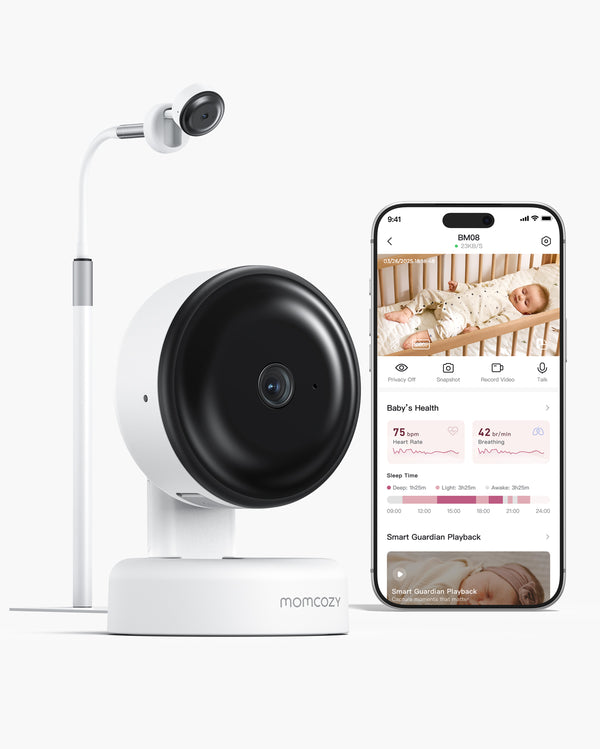
Parents seeking the Momcozy Contact-Free Smart Baby Monitor BM08 for app-based check-ins, sleep insights, smart notifications, no wearables, and no monthly fees.
|
|
Best for Everyday Video Checks
|
Caregivers looking for long battery life, clear night vision, and a durable parent unit for simple, everyday monitoring.
|
Ready to look closer at your options? Explore Momcozy Baby Monitors to see which setup best supports your family's routine.
What Makes a Baby Monitor Reliable?
When we talk about reliability in the context of baby gear, we are talking about consistent, everyday readiness. A reliable monitor is not necessarily the most expensive one on the shelf; rather, it is the one that seamlessly fits your nursery layout and parenting style without causing extra stress.
So, what should you actually look for?
-
Stable Signal: A dependable monitor maintains its connection through walls and floors, ensuring you do not lose feed when you step out to the kitchen or the backyard.
-
Consistent Video and Audio: You need clear, uninterrupted visuals and sound, especially in low-light conditions, so you can assess your baby's needs at a glance without physically entering the room.
-
Dependable Battery and Power: A parent unit that dies halfway through the night is a major source of anxiety. Everyday readiness means having a battery that can last through multiple naps and overnight stretches, or a reliable power cord setup.
-
Secure Setup: Hardware that stays where you put it. A flimsy mount that droops over time is an unreliable view.
-
Useful Notifications: An intelligent system that alerts you when it actually matters, keeping false alarms to a minimum so you can rest comfortably.
Baby Monitor Connectivity Options: WiFi, Non-WiFi, and Dual-Mode
-
Non-WiFi Monitors (Local Connection): These monitors use FHSS (Frequency-Hopping Spread Spectrum) technology to transmit a secure, direct signal from the camera to a dedicated parent unit screen. They do not rely on your home internet router. This means if your internet goes down, your monitor operates reliably. They offer a consistent and stable connection within a specific range, making them highly dependable for parents who value privacy and plug-and-play simplicity.
-
WiFi Monitors: These cameras connect to your home internet network and stream video directly to an app on your smartphone or tablet. Their main advantage is unlimited range—you can check in on your baby from the office or while running errands. However, their reliability is directly tied to the strength of your home internet. If your router is prone to dropping signals, your monitor will be too.
-
Dual-Mode Monitors: These offer the best of both worlds. They provide a dedicated parent unit screen that operates on a local, non-WiFi signal for reliable at-home use, while also allowing you to connect the camera to your WiFi network for app access when you are away.
Choosing the right connection type is crucial for your daily experience. For a deeper dive into which signal fits your home best, read our guide on choosing a WiFi vs non-WiFi baby monitor.
Durable Design Features Parents Should Check
-
Hardware and Setup Durability: Look for cameras with sturdy bases or secure wall mounts. A camera that easily gets knocked out of alignment when you change the sheets is frustrating to deal with daily. Additionally, check the build quality of the parent unit. Does it have a robust kickstand? Are the buttons tactile and responsive? If you are carrying the screen around the house, it needs to withstand the occasional bump against a doorframe.
-
Cord Management and Adjustability: A well-designed monitor should come with long, durable power cables that allow for safe routing away from the crib. The camera itself should offer smooth manual or remote pan, tilt, and zoom (PTZ) functions that do not degrade or get stuck over time.
-
Ease of Maintenance: A monitor used every day should be easy to move when traveling to grandma's house, easy to wipe clean, and most importantly, easy to quickly reconnect if you need to unplug it. Complicated pairing processes are the enemy of practical, everyday use.
- Video, Audio, Battery, and Range: The Everyday Reliability Checklist
- To ensure your monitor performs consistently, run through this practical checklist before making a decision.
-
Video Clarity: Can you see if your baby's eyes are open or closed? Look for high-definition resolution (like 720p or 1080p).
-
Night Viewing: Babies sleep in the dark. A reliable monitor must have crisp, invisible infrared night vision that provides a clear image without shining a disruptive red light into the crib.
-
Two-Way Audio: The sound should be clear and free of static. You want to be able to hear a sigh, but also be able to use the microphone to effectively soothe your baby from down the hall.
-
Connection Range: Check the manufacturer's stated range, but remember that walls and floors reduce this number. A strong, consistent range ensures you can be in the basement or the garden without the signal cutting out.
-
Parent Unit Battery Life: Look for monitors with high-capacity batteries (e.g., 4000mAh or higher) and power-saving modes (like VOX, where the screen wakes up only when sound is detected) to help ensure the monitor makes it through the night off the charger.
- For more detailed advice on evaluating camera specs, screen sizes, and visual features, explore our guide on finding the best video baby monitor.

Placement and Setup Can Make a Reliable Monitor Work Better
-
Distance and Signal Strength: If you are using a WiFi monitor, placing the camera in a dead zone at the far end of the house will lead to constant lagging and app crashes. If you use a non-WiFi monitor, thick concrete walls or large metal appliances between the camera and the parent unit can interfere with the signal.
-
Angle and Obstructions: The camera should be mounted high enough to get a comprehensive view of the sleep space, but safely out of arm's reach. Ensure there are no curtains, mobile toys, or bright lamps blocking the lens or interfering with the night vision sensors.
-
Setting Up Smart Monitors: If you opt for a device like the Momcozy Contact-Free Smart Baby Monitor BM08, proper placement is even more critical. Because it relies on advanced radar technology rather than physical bands or clips on the baby, it requires a stable, unobstructed view of the sleep area. Correctly angling the stand helps the system provide app-based check-ins, sleep insights, and smart notifications—all with no wearables required.
No Wearables Required
No Monthly Fees
Cry & Face Covering Notifications
2K Night Vision
Understanding how to optimize your camera's location is a game-changer. Learn more about safety and positioning by reading where to put a baby monitor.
Choosing a Reliable Monitor for One Room, Two Rooms, or Multiple Children
Single Room Setups: If you have one baby, your focus should be on a single, strong camera feed. Whether you prefer a dedicated parent unit screen or the smart app-based insights of a contact-free monitor, a one-to-one setup is usually the most straightforward and stable.
Multi-Room and Multiple Children: If you have a toddler in one room and a newborn in another, you need a system that supports multiple cameras paired to a single parent unit. Look for monitors that offer an automatic "scan mode" (which cycles audio and video between rooms every few seconds) or a "split-screen mode" (which lets you view two or more cribs simultaneously).
It is worth noting that for shared rooms or two cribs side-by-side, a multi-camera traditional video setup is often much more practical and dependable than trying to use a single smart monitor to cover a wide, divided area. For specific advice on setting up nurseries for multiples, check out our guide on baby monitors for twins.
Where Momcozy Fits in a Reliability-Focused Buying Guide
When evaluating options, it is helpful to look at how different models solve specific daily challenges. Rather than claiming one device is universally the "best," it is better to match the product to the parent's lifestyle.
-
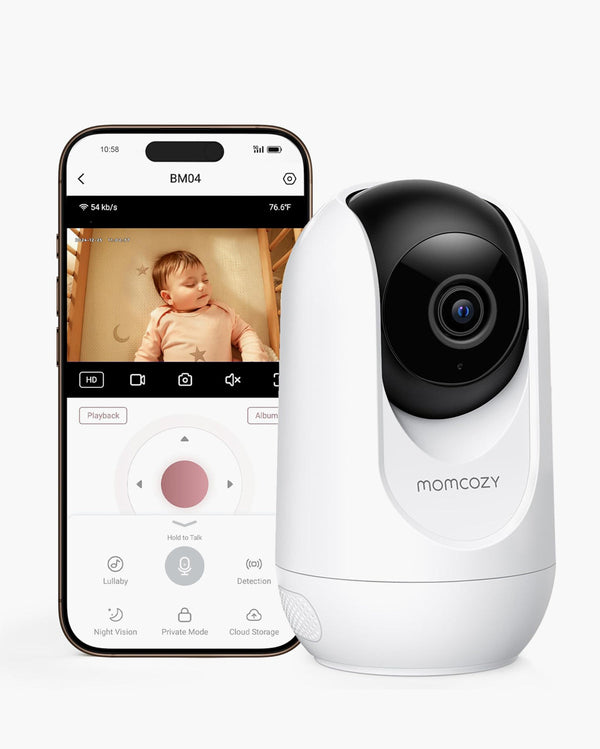
For Flexible Viewing (BM04): This is worth considering if you want dual-mode flexibility. It offers a dedicated parent unit for reliable overnight monitoring at home, plus app integration for when you are away.
-
For Plug-and-Play Simplicity (BM01 & BM03): If your primary concern is a secure, local connection that does not rely on your home internet, these local-viewing models are highly dependable. They prioritize long battery life, clear local video, and instant setup without the need to manage software updates or app pairings.
-
For Advanced Insights (BM08): If your goal is to gather general sleep patterns without disturbing your child, the Momcozy Contact-Free Smart Baby Monitor BM08 fits a very specific need. It is designed strictly for app-based check-ins, delivering sleep insights and smart notifications using radar technology. It involves no wearables for the baby and requires no monthly fees for the parents, making it a sustainable, long-term choice for a single dedicated sleep area.
Take the time to assess which features align with your daily routine. You can explore a detailed breakdown of all these options in our Momcozy baby monitor comparison guide, or browse Momcozy Baby Monitors to find your match.
FAQ
Q: What type of baby monitor is most reliable?
A: The most reliable monitor is the one that best fits your home's layout and your daily routine. For instant, secure, at-home viewing, non-WiFi (FHSS) monitors are incredibly dependable. For long-distance viewing and sleep data, smart app-based monitors are highly useful, provided you have a strong home internet connection.
Q: Is WiFi or non-WiFi more dependable?
A: Non-WiFi is generally more dependable for uninterrupted home use because it does not rely on your router's bandwidth or internet service provider. WiFi is dependable for parents who need to check in from the office, as long as their home network is strong and stable.
Q: What features make a baby monitor durable?
A: Look for sturdy camera mounts that hold their angle, a parent unit with a robust kickstand, tactile buttons, a large battery capacity that won't degrade quickly, and thick, safe power cables.
Q: Why does placement affect monitor performance?
A: Placing a camera too far from the router (for WiFi) or behind thick walls (for non-WiFi) degrades the signal, causing lag or disconnections. Poor placement can also cause glare from windows or block the camera's infrared night vision sensors.
Q: What should parents check before choosing a baby monitor app?
A: Check if the app requires a high-speed connection, how quickly it loads the live feed, whether it sends accurate notifications instead of constant false alarms, and most importantly, whether key features require an additional monthly subscription fee. The FTC has established standards for connected device security, so choosing brands that meet these requirements is essential for protecting your family's privacy.
Q: How do I choose a monitor for two rooms?
A: Look for a non-WiFi or dual-mode monitor that allows you to purchase and pair add-on cameras to a single parent unit. Ensure the parent unit offers split-screen viewing or an automatic scan mode so you can monitor both rooms seamlessly. If you'd like to compare models side by side, browse Momcozy Baby Monitors to view all traditional setups, or check out the Momcozy Contact-Free Smart Baby Monitor BM08 if you are specifically looking for contact-free smart monitoring without any monthly subscription fees.
Conclusion: Build a Nursery Setup You Can Truly Rely On
At the end of the day, the most reliable baby monitor is not defined by how many complicated gadgets it has, but by how consistently it performs the job you hired it to do. Whether that means holding a steady signal through a brick wall, providing a battery that survives a twelve-hour night shift, or delivering clear app notifications without false alarms, reliability is about reducing parental anxiety, not adding to it.
By evaluating your home's layout, your preference for local versus app viewing, and your need for durable hardware, you can select a system that will support your family reliably from the newborn phase well into the toddler years.
Take the next step in building a dependable nursery setup and explore Momcozy Baby Monitors today. Whether you need a simple dual-camera setup for growing siblings or the specific app-based sleep insights of the BM08, there is a dependable solution ready for your everyday routine.