For many families, a smart baby monitor is worth the price when it solves a real daily problem: checking the nursery from a phone, getting useful alerts, reviewing sleep patterns, or avoiding wearable sensors. It may not be worth the upgrade if you only need simple local video, have a strict budget, do not want an internet-connected camera, or feel more anxious when shown detailed data.
The best answer is not simply "yes" or "no." It depends on your budget, privacy preferences, home WiFi reliability, caregiving routine, and how much value you place on smart features beyond basic video and sound.
Important safety note: A smart baby monitor is an everyday monitoring tool. It is not a medical device, does not prevent SIDS, and should not replace adult supervision, safe sleep practices, or advice from your pediatrician. Parents with medical concerns should follow a clinician's guidance rather than relying on a consumer monitor.
Quick Answer: When Is a Smart Baby Monitor Worth It?
|
Family Situation
|
Smart Monitor Value
|
Better Fit If Not Needed
|
|
You want phone access
|
Worth considering if you need app viewing while in another room, at work, or when another caregiver is home.
|
A local video monitor may be enough if you only check from inside the house.
|
|
You want fewer unnecessary room visits
|
Smart notifications and clear video can help you observe before walking in.
|
A standard video monitor may be enough if your baby is an easy sleeper.
|
|
You like sleep trends
|
Sleep summaries may help you spot bedtime patterns over several nights.
|
Skip advanced analytics if detailed data increases your anxiety.
|
|
You want no wearable sensors
|
A contact-free smart monitor may be more comfortable than socks, bands, or clips.
|
A regular video monitor may be enough if you do not need breathing-related insights.
|
|
You are privacy focused
|
Choose carefully and verify encryption, account controls, storage, firmware updates, and whether remote viewing can be disabled.
|
A non-WiFi parent-unit monitor may suit you better if offline viewing is the priority.
|
|
You have weak WiFi
|
Only worth it if the monitor also has a reliable local mode or your network can support stable video.
|
Choose a non-WiFi or dual-mode monitor if internet reliability is limited.
|
What Is a Smart Baby Monitor?
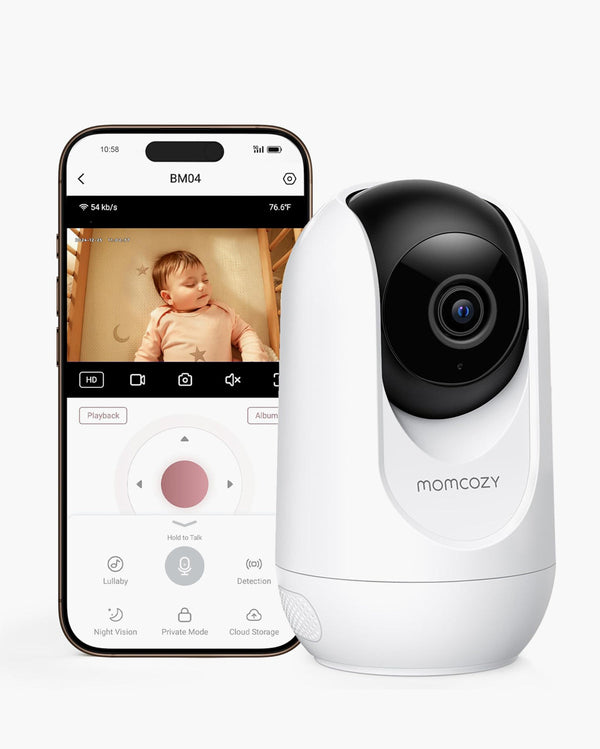
A smart baby monitor usually combines video monitoring with app access, notifications, storage options, and sleep-related insights. Unlike a simple audio or video unit, it may use software to identify crying, motion, room conditions, sleep patterns, or other events that parents want to review later.
That does not mean every smart monitor has the same capabilities. Some are mainly WiFi cameras with alerts. Others add sleep analytics, wearable sensors, under-mattress pads, or contact-free sensing. Before paying a premium, compare the exact features in the product page, user manual, app description, subscription terms, and privacy settings.
|
Feature Category
|
Traditional Monitor
|
Smart Monitor
|
|
Connection
|
Usually local parent-unit viewing
|
Often WiFi/app viewing; some models are dual-mode
|
|
Viewing method
|
Dedicated screen or audio unit
|
Smartphone app, sometimes with a parent unit
|
|
Range
|
Limited by local signal range
|
Remote viewing may be possible when internet access is enabled
|
|
Data
|
Live audio/video only
|
May include sleep summaries, motion alerts, or event history
|
|
Alerts
|
Sound or movement alerts on select models
|
Crying, motion, face-covering, room condition, or sleep-related alerts depending on model
|
|
Cost structure
|
Usually lower upfront cost and fewer software features
|
Higher upfront cost; some brands add paid subscriptions
|
Why Parents Consider Paying More for a Smart Baby Monitor?
- Remote app viewing: Useful for parents who want to check in from another room, from the yard, or while another caregiver is home.
- Smart notifications: Alerts may reduce the need to stare at a live feed, especially when the monitor can distinguish common events such as crying, movement, or room changes.
- Sleep trend summaries: Helpful for parents who want to understand bedtime consistency, night waking patterns, nap timing, or environmental factors over several nights.
- Contact-free monitoring options: Some parents prefer a system that does not require socks, clips, bands, or patches on the baby.
- Better video and night viewing: Premium models often provide clearer resolution, stronger night vision, zoom, and two-way audio.
- Caregiver sharing: App-based systems may support multiple authorized users, which can help families coordinate care when permissions are managed carefully.
Potential Drawbacks of Smart Baby Monitors
- Higher upfront price: Smart monitors usually cost more than basic audio or local video monitors.
- Possible subscription costs: Some brands charge monthly fees for video history, sleep reports, cloud storage, or advanced alerts. Confirm exactly what is included before buying.
- WiFi dependency: App viewing and cloud features may be affected by weak home internet, router placement, or service outages.
- Privacy and account security: Any internet-connected camera requires careful setup, strong passwords, software updates, and access control.
- Data anxiety: Some parents feel calmer with more information, while others feel more stressed when reviewing breathing graphs, sleep stages, or frequent alerts.
- Feature mismatch: Paying for advanced monitoring is not useful if your family mainly wants a simple live video feed.
Is a Smart Baby Monitor Worth the Price?
A smart baby monitor is most likely worth it when the smart features solve a specific household need. It is less likely to be worth it when the premium features will not change how you care for your baby day to day.
|
Priority
|
Worth Paying More If...
|
Consider a Simpler Option If...
|
Feature to Verify
|
|
Budget
|
You want a long-term nursery system and will use app alerts or sleep summaries.
|
You need a reliable camera at the lowest practical cost.
|
What features are included without a subscription?
|
|
Privacy
|
You are comfortable managing app accounts, passwords, updates, and permissions.
|
You prefer a camera that does not connect to the internet.
|
Can remote access be disabled? Is storage local or cloud-based?
|
|
Data
|
Sleep trends help you make calmer routine decisions.
|
Detailed graphs increase your anxiety or lead to over-checking.
|
What is measured, and what is only estimated?
|
|
Network
|
Your WiFi is stable where the camera will be placed.
|
Your nursery has weak signal or frequent outages.
|
Does the monitor have a parent-unit or local fallback?
|
|
Comfort
|
You want contact-free insights without wearable sensors.
|
You only need audio/video confirmation.
|
Does the system require socks, clips, bands, or special sleepwear?
|
Contact-Free, Wearable, and Standard Monitors: Key Tradeoffs
The premium price often depends on the technology type. A contact-free monitor is not automatically better for every family, and a wearable monitor is not automatically wrong. The better choice depends on your tolerance for setup, maintenance, data, and comfort.
|
Type
|
How It Works
|
Main Advantage
|
Possible Limitation
|
|
Standard video monitor
|
Shows live audio/video through a screen or app.
|
Usually simpler and less expensive.
|
Limited insights beyond live viewing.
|
|
Wearable smart monitor
|
Uses a sock, band, or clip to collect movement or wellness-related signals.
|
Moves with the baby and may provide direct sensor data.
|
Requires charging, correct fit, and may bother some babies.
|
|
Contact-free smart monitor
|
Uses camera and/or sensing technology from a fixed position near the sleep area.
|
No socks, patches, clips, or bands on the baby.
|
Requires careful placement and a clear monitoring area.
|
|
Dual-mode monitor
|
Combines a parent unit with optional app viewing.
|
Useful for families wanting both home screen viewing and phone access.
|
May cost more than a simple local monitor.
|
Where the Momcozy BM08 Fits
The Momcozy Contact-Free Smart Baby Monitor BM08 may be a good fit for parents who want app-based viewing, contact-free sleep-related insights, smart notifications, and no wearable sensors. According to current Momcozy product information, BM08 highlights no wearables required, no monthly fees, cry and face-covering notifications, 2K night vision, AES 256-bit encryption, Privacy Mode, local storage support, and app-based monitoring features.
Those claims should still be read as current product information rather than a permanent guarantee. Before purchasing, parents should confirm the latest product page, app terms, supported features, storage options, and regional availability.
Important BM08 boundary: BM08 is designed for everyday home monitoring support. Its sleep-related insights, breathing dynamics, heart dynamics, and alerts should be treated as reference information. They are not medical measurements, diagnoses, treatment, SIDS prevention, or a substitute for adult supervision or safe sleep practices.
When a Simpler Monitor May Be a Better Buy
- You only need a live view from the next room.
- You do not want an app-connected camera in the nursery.
- Your home WiFi is unreliable and you do not want to upgrade the network.
- Sleep reports or breathing-related insights make you more anxious rather than calmer.
- You prefer a dedicated parent screen and do not need remote phone access.
- Your budget is better spent on other nursery essentials.
Privacy and Setup Checks Before You Buy
The value of a smart monitor depends partly on how securely it is set up. For any internet-connected camera, review the brand's privacy design and your own home network habits before relying on remote access.
- Check whether the brand documents encryption for transmitted and stored data.
- Confirm whether multi-factor authentication or strong account controls are available.
- Review guest-user permissions before inviting relatives, babysitters, or caregivers.
- Update the app, firmware, and router software when updates are available.
- Use a strong, unique app password and avoid shared logins.
- Consider placing smart nursery devices on a separate home network if your router supports it.
- Confirm how video clips, sleep summaries, and event history are stored and deleted.
- Place the camera with a focused nursery view, not a wide angle into private living spaces.
Smart Baby Monitor Buying Checklist
- Do I need phone access, or is a local parent screen enough?
- Will smart alerts reduce unnecessary checking, or will they increase my anxiety?
- Are sleep summaries included, and are they useful for my routine?
- Does the monitor require wearables, special clothing, or under-mattress sensors?
- Are there required monthly fees for the features I actually want?
- What happens if WiFi is weak or the app is unavailable?
- What privacy controls, encryption, account permissions, and storage options are documented?
- Is the device clearly described as a consumer monitor rather than a medical product?
- Can the camera be placed safely with cords out of reach?
- Does the return policy or warranty give me enough flexibility if it does not fit my home?
Frequently Asked Questions
Is a smart baby monitor worth the price for first-time parents?
It can be worth it if app viewing, smart notifications, or sleep summaries help you feel more organized and less likely to interrupt your baby unnecessarily. It may not be worth it if extra data increases anxiety or if you only need simple audio/video monitoring.
What is the difference between a smart baby monitor and a regular monitor?
A regular monitor usually provides live audio and video. A smart monitor may add app viewing, alerts, event history, sleep summaries, storage options, and caregiver sharing, depending on the model.
Do smart baby monitors require WiFi?
Many smart monitors rely on WiFi for app viewing and cloud-connected features. Some dual-mode monitors include both a parent unit and optional app viewing. Check whether the device still works if WiFi is unavailable.
Do all smart baby monitors have subscription fees?
No. Some brands require monthly plans for video history or analytics, while others include core features without a recurring fee. Confirm the latest subscription policy before buying because app features and pricing can change.
Is a contact-free smart baby monitor better than a wearable one?
It depends on your priorities. Contact-free designs avoid socks, clips, and bands, which some parents prefer. Wearables may suit families who specifically want sensor-based tracking that stays with the baby. Both require realistic expectations and careful setup.
Does the Momcozy BM08 require a monthly fee?
According to current Momcozy product information, BM08 does not require a subscription for smart monitoring features. Parents should still confirm current app terms and feature availability before purchase.
Is BM08 a medical device?
No. BM08 is a consumer baby monitor for everyday care support. It is not intended to diagnose, treat, prevent, or monitor medical conditions, and it should not replace adult supervision, safe sleep practices, or pediatric advice.
Can a smart baby monitor reduce the risk of SIDS?
No consumer baby monitor should be used as a strategy to reduce SIDS risk. Follow safe sleep guidance, keep the sleep space clear, place baby on the back for sleep, and speak with a pediatrician about medical concerns.
Conclusion
A smart baby monitor is worth the price when its extra features match a real household need: remote app viewing, smart notifications, contact-free monitoring, sleep summaries, or coordinated caregiver access. It is not automatically better than a simpler monitor, and it should never be treated as a medical safety device.
For parents comparing contact-free options, the Momcozy BM08 is one model to consider because it focuses on no-wearable smart monitoring, app-based check-ins, and no monthly fees according to current Momcozy product information. For parents who mainly want simple viewing or stronger offline privacy, a local video monitor or a dual-mode setup may be the more practical choice.
The most useful purchase is the one that fits your routine, your budget, your privacy comfort level, and your baby's sleep environment without creating unnecessary anxiety.