You put the baby down, walk to the kitchen, and immediately wonder if everything is okay in the nursery. That need to check from another room or while you are away is exactly why so many parents are choosing a WiFi baby monitor. The best WiFi baby monitor gives you reliable app viewing, clear video, privacy protection, and a setup that works without a monthly fee.
This guide focuses specifically on WiFi and app-connected monitors, not general baby monitors or non-WiFi parent-unit options.
In This Article
|
Quick Pick
|
Best For
|
|
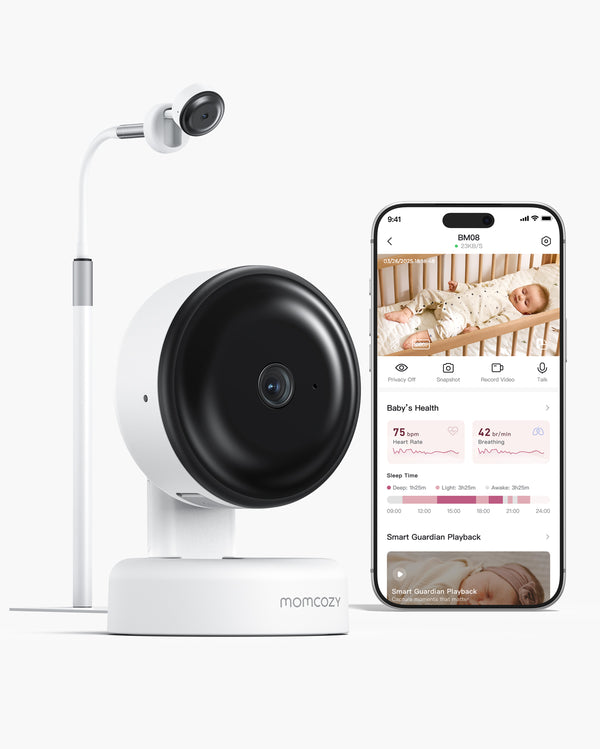
Momcozy Contact-Free Smart Baby Monitor BM08
|
Contact-free smart app check-ins, no wearables, no monthly fees
|
|
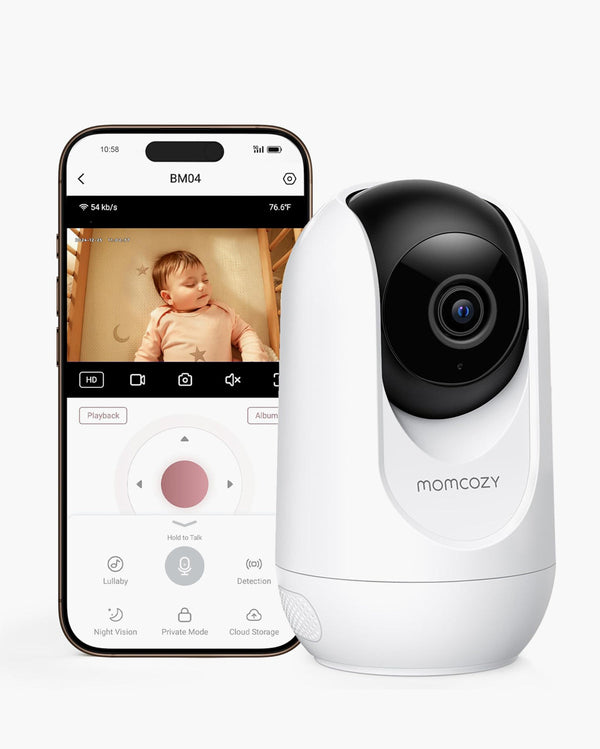
Momcozy 5-Inch Dual-Mode Smart Baby Monitor BM04
|
Dual-mode viewing with parent unit and app
|
|
Best for video quality
|
See video quality section
|
|
Best for security
|
See privacy and security section
|
|
Best non-WiFi local option
|
Momcozy 1080P High-Performance Video Baby Monitor BM01
|
What Is a WiFi Baby Monitor?
A WiFi baby monitor connects to your home WiFi network so you can view the nursery through a smartphone app or other connected device. You are not limited to a single handheld screen.
With a WiFi monitor, you get app-based phone viewing, remote access outside the home, and features like smart notifications and video history.
With a non-WiFi parent-unit monitor, everything stays local and no internet connection is required.
If you are searching for the best baby monitor with app viewing or a baby monitor that connects to your phone, a WiFi model is what you need. Parents who want a broader comparison across all monitor types will find the best baby monitor 2026 guide useful.
Why Choose a Baby Monitor with App or Phone Connection?
App-connected monitors fit a wide range of real-life situations.
-
Check from another room without carrying a separate screen around the house.
-
Check while away at work or running errands and still get a live view of the nursery.
-
Share access with a partner or caregiver so both people can view the feed from their own devices.
-
Receive smart notifications and stay informed without watching the screen constantly.
-
Review video clips on monitors that support local or cloud storage.
When a Baby Monitor That Connects to Phone Makes Sense
Phone-connected monitoring works best for parents who are often in different parts of the house or regularly away during nap time. It also suits families where two caregivers need simultaneous access.
For parents mainly interested in contact-free features or the best smart baby monitor options, that guide goes deeper on sleep insights and app-based smart monitoring.
WiFi Baby Monitor vs Non-WiFi Baby Monitor
The right fit depends on your priorities.
|
Feature
|
WiFi / App Monitor
|
Non-WiFi / Parent Unit
|
Dual-Mode
|
|
Remote access
|
Yes, via app
|
No
|
Yes, app and local unit
|
|
Phone viewing
|
Yes
|
No
|
Yes
|
|
Internet required
|
Yes
|
No
|
Depends on mode
|
|
Privacy setup
|
Requires secure configuration
|
Minimal
|
Managed via settings
|
|
Account sharing
|
Yes
|
No
|
Yes
|
|
Example
|
Momcozy BM08
|
Momcozy BM01
|
Momcozy BM04
|
The Momcozy 5-Inch Dual-Mode Smart Baby Monitor BM04 works as a standard parent-unit monitor at home and switches to app-based viewing when you need remote access.
The Momcozy 1080P High-Performance Video Baby Monitor BM01 is a local video option for parents who prefer a screen-only setup without internet.
The Momcozy Contact-Free Smart Baby Monitor BM08 is app-only, with smart notifications and no wearables required.
No Wearables Required
No Monthly Fees
Cry & Face Covering Notifications
2K Night Vision
What to Look for in the Best WiFi Baby Monitor
App Viewing and Phone Connection
Look for an app that loads the live feed quickly and sends notifications you can act on.
- Supports multiple user accounts so both parents can view without sharing one login
- Compatible with your phone's operating system (iOS and Android)
- Allows remote viewing outside your home network, not only on local WiFi
Video Quality and Camera View
Clear video matters most when the room is dark.
- Look for 1080p or higher resolution and reliable night vision
- Check that the camera has enough pan and tilt range to cover the full crib
- Resolution, zoom, and night vision are covered in depth in the best video baby monitor roundup
Connection Stability
A WiFi monitor is only as good as your network. Place the camera within a reasonable distance from your router or a mesh node. Most monitors perform best on 2.4GHz for range, though some support 5GHz for faster speeds.
Privacy and Security
Look for encrypted video transmission and regular app updates from the manufacturer. Use a strong unique password and limit who has login access. CISA recommends securing connected home devices through proper home network security practices, including WPA2 or WPA3 router encryption.
The best secure baby monitor guide covers encryption standards and privacy settings in depth.
Subscription Cost
Some WiFi monitors offer full features with no monthly fee. Others lock video history or smart alerts behind a paid plan. Check what is included for free before purchasing.
Smart Features
Some WiFi monitors go beyond video. Features like sleep summaries, smart cry detection, and contact-free monitoring support give parents more context during check-ins, with no socks, patches, or wearable sensors on the baby.
How to Choose the Best WiFi Baby Monitor
Use this decision tree to find your starting point before reviewing the product picks below.
Do you need to view the nursery from your phone or outside the home?
- No → A non-WiFi parent-unit monitor may be all you need. See Momcozy 1080P High-Performance Video Baby Monitor BM01.
- Yes → Continue below.
Do you also want a dedicated parent unit screen at home?
- Yes → A dual-mode monitor covers both. See Momcozy 5-Inch Dual-Mode Smart Baby Monitor BM04.
- No → Continue below.
Is privacy and security your top concern?
- Yes → Prioritize AES-256 encryption, two-factor authentication, and a clean privacy policy. The best secure baby monitor guide covers what to look for.
- No → Continue below.
Do you want no monthly fees?
- Yes → Confirm which features are free before buying. Options include Momcozy BM08, Owlet Cam 2, and CuboAi Smart Baby Monitor 3.
- No → Continue below.
Do you want contact-free smart monitoring with sleep insights?
- Yes → See Momcozy Contact-Free Smart Baby Monitor BM08.
- No → Any of the app-based WiFi monitors in this guide will serve you well.
Top WiFi Baby Monitor Picks for 2026
1. Momcozy Contact-Free Smart Baby Monitor BM08: Best for Contact-Free Smart App Check-ins
The Momcozy Contact-Free Smart Baby Monitor BM08 uses non-contact mmWave radar sensing to provide breathing dynamics, heart dynamics, and sleep insights. No socks, no patches, and no clips on tiny fingers at night.
The 2K HD video feed with 940nm invisible infrared night vision lets you see clearly in complete darkness. No red glow, no disturbed sleep.
AI-powered detection covers crying, face-covering, and stomach-sleeping. Smart notifications reach your phone only when they matter, which means fewer false alerts at 2 a.m.
Sleep summaries are available every night with no subscription required.
What you get:
-
2K HD video with 940nm invisible infrared night vision
- Non-contact mmWave sensing for breathing dynamics and heart dynamics
- AI cry detection, face-covering detection, and stomach-sleeping detection
-
AES-256 encryption with a physical privacy shutter
- Local SD card storage and cloud storage options
- No monthly fees for core features
- Floor stand and foldable travel stand included
- Dimensions: 17.9 × 8.6 × 3.3 in (45.5 × 21.8 × 8.4 cm), weight: 6.9 lbs (3,130 g)
The BM08 is app-only with no separate parent unit. It is not a medical device and is not intended for diagnosing or treating any health condition. For parents who want to explore the best smart baby monitor options more broadly, that category goes deeper on app-based smart features.
2. Momcozy 5-Inch Dual-Mode Smart Baby Monitor BM04: Best for Parent Unit Plus App
The Momcozy 5-Inch Dual-Mode Smart Baby Monitor BM04 gives you a 5-inch parent unit for home use and full app-based phone viewing for when you are away. You never have to choose one method over the other.
The parent unit lasts up to 10 hours with the screen always on, so overnight monitoring is covered without a mid-shift charge. Caregivers on-site use the handheld screen while a parent away from home checks in through the app.
What you get:
- 5-inch parent unit with up to 10-hour battery life (screen on)
- App viewing for remote check-ins
- 1080p video with pan, tilt, and 2x/4x zoom
- Support for up to 4 cameras with split-screen view
- Encrypted video transmission
- Motion alerts, cry detection, and two-way talk
- No monthly subscription required for core features
For parents monitoring two babies or two rooms, the best baby monitor for twins guide covers multi-camera setups in more detail.
3. Nanit Pro: Best for Premium WiFi Sleep Insights
The Nanit Pro is a wall-mount or floor-stand WiFi camera that streams 1080p HD video to the app from a top-down view of the crib. It is designed for parents who want detailed sleep data alongside video monitoring.
The Nanit app includes cry detection, sound and motion notifications, temperature and humidity readings, and split-screen viewing for two cameras. Security features include 256-bit AES encryption and two-factor authentication.
Full sleep analytics, personalized sleep tips, and extended video history require a paid Nanit Insights subscription after the free trial period ends.
4. Owlet Cam 2: Best for Simple WiFi Setup with No Monthly Fee
The Owlet Cam 2 streams 1080p HD video over encrypted WiFi directly to the Owlet Dream App. Setup is straightforward, and core features are available with no subscription required.
The camera includes night vision, a wide-angle view, 4x zoom, two-way talk, and sound, motion, and cry notifications. Room temperature and humidity readings are displayed in the app. Video clips triggered by sound or motion are stored for 48 hours at no cost.
Parents who want extended video history can upgrade through the Owlet360 plan in the app.
5. CuboAi Smart Baby Monitor 3: Best for AI Safety Alerts and Face Detection
The CuboAi Smart Baby Monitor 3 uses AI detection to alert parents when a baby's face is covered, when they roll over, or when they enter a defined danger zone. These proactive alerts are available without a subscription.
Video and audio: 2.5K QHD video, 940nm infrared night vision, two-way audio, temperature and humidity sensing.
Security: AES-256 encryption, two-factor authentication, CTIA Cybersecurity Certified. Up to 8 family members can view the feed simultaneously.
Storage: 72 hours of video playback included at no cost. Advanced sleep analytics and extended storage are available through a paid membership plan.
Top WiFi Baby Monitor Options
|
Model
|
Best For
|
App/Phone
|
Parent Unit
|
Video
|
Security
|
Monthly Fees
|
Why Parents May Like It
|
|
Momcozy BM08
|
Contact-free smart app check-ins
|
Yes
|
No
|
2K HD
|
AES-256 encryption
|
No
|
No wearables, sleep insights, and strong encryption with no ongoing cost
|
|
Momcozy BM04
|
Dual-mode: parent unit and app
|
Yes
|
Yes, 5-inch
|
1080p
|
Encrypted transmission
|
No
|
Flexible setup for both on-site caregivers and remote parents
|
|
Nanit Pro
|
Premium WiFi sleep insights
|
Yes
|
No
|
1080p
|
AES-256, 2FA
|
Subscription for full analytics
|
Strong security and detailed sleep data for parents who want more than video
|
|
Owlet Cam 2
|
Simple WiFi setup, no monthly fee
|
Yes
|
No
|
1080p
|
AES-128, TLS
|
No (core features free)
|
Clean app, easy setup, and basic smart alerts without a paid plan
|
|
CuboAi Smart Baby Monitor 3
|
AI safety alerts and face detection
|
Yes
|
No
|
2.5K QHD
|
AES-256, 2FA, CTIA certified
|
No (core features free)
|
Proactive AI alerts for face covering and rollover, with 72-hour free playback
|
Best WiFi Baby Monitor with App: What Matters Most?
The app experience is the deciding factor for many parents. Before committing to a monitor, check these points.
Account and access:
- Does the app support multiple user accounts, or do both parents share one login?
- Can you control which notifications you receive?
Compatibility and viewing:
- Does the app work on both iOS and Android?
- Does remote viewing work on cellular data, not just home WiFi?
Storage:
- Is video history stored locally, in the cloud, or both?
- What is included for free, and what requires a paid plan?
Privacy settings inside the app matter as much as hardware security. Review account permissions after setup and turn off any access you do not use.
Best Baby Monitor That Connects to Phone: Setup and Buying Tips
Before you buy, confirm these details.
|
What to Check
|
Why It Matters
|
|
WiFi band requirement
|
Most app-based monitors need 2.4GHz or dual-band. Verify before setup.
|
|
App compatibility
|
Confirm the app works with your current phone OS version.
|
|
Remote access
|
Make sure remote viewing works outside your home network, not only on local WiFi.
|
|
Account sharing
|
Find out how many users can be added and whether simultaneous viewing is supported.
|
|
Video history
|
Know whether clips save locally, in the cloud, or live view only.
|
|
Backup method
|
Understand what happens to your view if WiFi drops.
|
The Momcozy Contact-Free Smart Baby Monitor BM08 is app-only. The Momcozy 5-Inch Dual-Mode Smart Baby Monitor BM04 includes a parent unit as a backup if you prefer a dedicated screen at home.
Are WiFi Baby Monitors Safe?
WiFi monitors are safe when set up correctly. Unauthorized access to a video feed usually comes from weak passwords and unsecured home networks, not from flaws in the monitor itself.
Practical steps to protect your monitor:
- Use a strong, unique password for your monitor account. Do not reuse passwords from other services.
- Enable two-factor authentication if the app supports it.
- Keep the app and firmware updated. Updates often address security vulnerabilities.
- Secure your home router with WPA2 or WPA3 encryption and change the default router password.
- Limit account sharing to people who genuinely need access.
- Disable remote access when you are home and do not need it.
For a full comparison of security features across monitor types, including encryption standards and non-WiFi alternatives, the best secure baby monitor guide is a useful resource.
Setup Tips for Your WiFi Baby Monitor
-
Place the camera close to your router or a mesh WiFi node. Thick walls and floors reduce signal strength significantly.
-
Run the app connection test before your baby's first nap in the new setup. Confirm live video loads and notifications arrive on your phone.
-
Position the camera at least 3 feet (about 1 m) from the crib and above mattress level. Keep all cords out of reach. The AAP recommends maintaining a clear, uncluttered safe sleep environment for infants.
-
Review app privacy settings after setup. Set a strong password, check who has account access, and turn off features you do not use.
-
Test remote access from outside your home WiFi before you need it in a real situation.
FAQs
Q1: What Is the Best WiFi Baby Monitor?
It depends on your setup. For app-only monitoring with contact-free smart features and no monthly fees, the Momcozy Contact-Free Smart Baby Monitor BM08 is a strong fit. For both a parent unit and app access, the Momcozy 5-Inch Dual-Mode Smart Baby Monitor BM04 covers both. Decide whether you need remote access, a dedicated screen, or sleep insights first, then choose accordingly.
Q2: What Is the Best Baby Monitor with App?
Look for an app that loads quickly, sends useful notifications, and supports multiple user accounts. Confirm it works on your phone's OS and allows remote viewing outside your home network. Both the Momcozy BM08 and BM04 include app connectivity with no required subscription for core features.
Q3: Can a Baby Monitor Connect to Your Phone?
Yes. WiFi baby monitors connect to your phone through a dedicated app. Once set up, you can view the live feed, receive notifications, and adjust camera settings from your phone. Monitors like the Momcozy 5-Inch Dual-Mode Smart Baby Monitor BM04 also include a parent unit for home viewing.
Q4: Do WiFi Baby Monitors Work Without Internet?
Not fully. A WiFi monitor needs an active internet connection for remote access and app notifications. If your WiFi goes down, most app-based monitors lose remote functionality. The Momcozy BM04 can fall back to local parent-unit viewing when WiFi is unavailable.
Q5: Are WiFi Baby Monitors Safe from Hacking?
Yes, when set up correctly. Use a unique password for your monitor account, keep the app updated, and secure your home router. Monitors with AES-256 encryption, like the Momcozy BM08, add an extra layer of data protection.
Ready to Find Your Monitor?
The best WiFi baby monitor comes down to a few practical questions: Do you need phone access? Do you also want a parent unit at home? How important is privacy to you? Momcozy offers options across all three needs, from the app-first Momcozy Contact-Free Smart Baby Monitor BM08 to the dual-mode Momcozy 5-Inch Dual-Mode Smart Baby Monitor BM04. Compare Momcozy Baby Monitors to find the right fit for your nursery.