Monitoring one baby in one nursery is straightforward. Monitoring two children in separate nap rooms, managing caregiver handoffs, and giving parents controlled remote access is a different challenge entirely. The best baby monitor for daycare-style care is not the one with the most features. It is the one that fits the number of children, the number of rooms, the daily workflow, and the privacy needs of everyone involved. What counts as a "daycare setup" varies more than most guides acknowledge, and that matters for how you choose.
In This Article
| Quick Pick |
Best For |
| Momcozy 5-Inch Dual-Mode Smart Baby Monitor BM04 |
App and parent-unit flexibility |
| Momcozy 5.5-Inch Full HD Video Baby Monitor BM03 |
Simple local video monitoring |
| Momcozy 1080P High-Performance Video Baby Monitor BM01 |
Additional camera coverage |
| Infant Optics DXR-8 Pro |
Secure non-WiFi viewing |
| Babysense Max View |
Multi-camera split-screen |
| Momcozy Contact-Free Smart Baby Monitor BM08 |
One baby or one dedicated sleep space only |
What Does "Baby Monitor for Daycare" Really Mean?
When parents search for a daycare baby monitor, the setup they have in mind varies widely.
-
Home daycare or family care: A caregiver looks after two or more children in a home setting, possibly in separate rooms.
-
Nanny share: Two families share one caregiver, sometimes across different nap spaces.
-
Babysitter setup: A temporary caregiver needs a monitor that is simple to hand over and use without a long setup process.
-
Multi-child household: Parents with two or more children want coverage across more than one room.
Consumer baby monitors can support all of these scenarios for visibility and check-ins. They are not designed for licensed commercial daycare compliance and should not be framed that way. What they can do is give caregivers better visibility and give parents more controlled access, as long as the monitor is chosen with the right priorities in mind.
Key boundaries to agree on before setup:
- Caregivers and parents need clear, agreed-upon access rules before the monitor goes live.
- Privacy and consent matter more when more than one family is involved.
- A monitor supplements caregiver attention. It does not replace it.
Why Daycare Setups Need a Different Baby Monitor
Those priorities shift significantly once more than one child or one room is involved.
More than one child may need monitoring. Two children napping in separate rooms means one camera may not cover everything.
Caregivers need a reliable on-site tool. A caregiver managing two children cannot rely on a phone app alone. A dedicated parent unit is more practical during active care hours, with no phone to unlock and no login required.
Parents may want remote access with controlled boundaries. App-based viewing is useful for parents who are away, but account sharing and privacy settings need careful management when more than one family is involved.
Daily durability matters more than novelty features. A monitor used eight or more hours a day needs simple controls, a stable connection, and a battery that lasts through the care day without interruption.
If you are still deciding which monitor type fits your overall setup, the best baby monitor 2026 guide covers the full category comparison.
Types of Baby Monitors That Work for Daycare-Style Setups
Not every monitor type fits every care arrangement. Here is how the main categories compare.
| Type |
Best For |
Pros |
Limitations |
| Parent-unit video monitor |
Local screen for quick on-site checks |
Simple setup, no account sharing needed |
No remote access |
| WiFi baby monitor with app |
Remote check-ins with controlled access |
Flexible viewing from anywhere |
Requires stable network and privacy settings |
| Dual-mode baby monitor |
Caregivers on-site plus parents viewing remotely |
Best balance for multi-person access |
Access settings need careful management |
| Two-camera / multi-room monitor |
Two nap rooms, two cribs, or shared spaces |
Covers more than one sleep space |
Requires more placement planning |
| Contact-free smart monitor |
One baby, one dedicated sleep space |
Smart check-ins, no wearables |
Not suited as primary monitor for multiple children |
For most daycare-style setups, a dual-mode or multi-camera monitor covers the widest range of needs. Which one is right depends on the specifics of your arrangement.
What to Consider When Choosing the Best Baby Monitor for Daycare
Number of Rooms and Camera Views
One camera covers one room. If children nap in separate rooms, plan for at least two cameras from the start. Split-screen viewing is more useful during active care than switching between feeds, so check whether the parent unit supports it natively.
Parent Unit vs App Viewing
A parent unit is the more practical tool for caregivers on-site. It requires no phone, no login, and no WiFi. App viewing works well for parents who want remote check-ins during the day, but it needs clear access boundaries when more than one family is involved.
For parents who want to go deeper on app-based monitoring options, the best WiFi baby monitor guide covers remote viewing and account management in detail.
WiFi Reliability and Privacy
If the setup uses a WiFi monitor, a stable home network is essential. Dropped connections during care hours create gaps in visibility. Set strong passwords, use separate accounts for each viewer where possible, and review access regularly.
Secure Access and Permissions
Avoid sharing one login across multiple caregivers or families. For non-WiFi monitors, agree on who has physical access to the parent unit and when it is returned.
Camera Placement and Cable Safety
In a daycare-style setup, children move more and occupy more spaces. Use stable wall or shelf mounting, keep all cords out of reach, and position cameras to cover every nap area without blind spots.
Durability and Daily Use
Daily handoffs, longer operating hours, and multi-room setups all put more wear on a monitor. Choose a model with a simple interface that a new caregiver can pick up quickly.
No Monthly Fees
Subscription costs add up on a setup that runs daily. Subscription-free monitors with local storage or no-cost core features reduce the long-term cost of ongoing care.
Once you have worked through these criteria, the checklist below helps translate them into concrete decisions before you buy and before you install.
Infographic: Daycare Baby Monitor Setup Checklist
Before you buy, decide:
- How many children need monitoring at once?
- How many nap rooms or sleep spaces are involved?
- Does the caregiver need a local parent unit, or is app viewing enough?
- Do parents need remote check-in access? If so, who controls the account?
- Is privacy a top concern? Non-WiFi or encrypted WiFi?
- Are subscription-free features a priority?
Before you install:
- Position cameras above mattress level with a clear view of the full nap area
- Route all cords safely out of reach of children
- Set separate logins or permissions for each viewer before care begins
- Confirm a stable power source for each camera
- Test the connection from every location where caregivers will monitor
- Agree on a daily check-in workflow with all parties before the first care day
The products below are organized around the most common answers to these questions.
Best Baby Monitors for Daycare: 2026 Picks
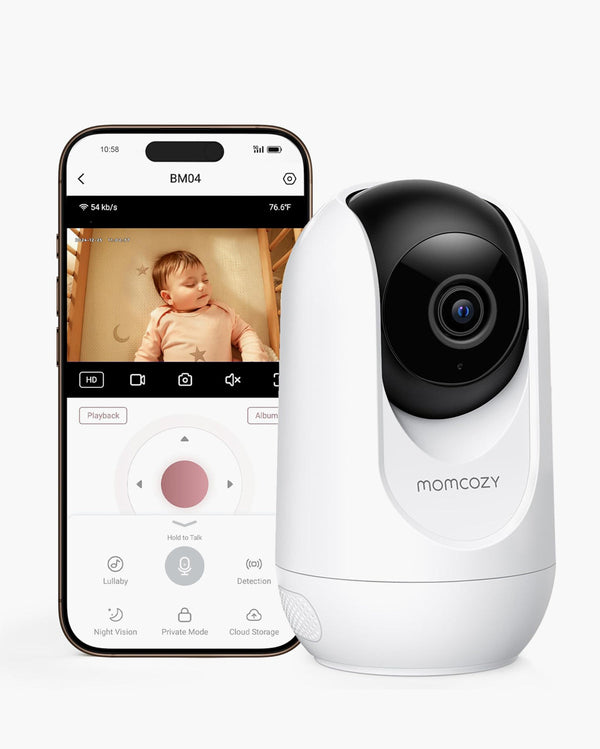
1. Momcozy 5-Inch Dual-Mode Smart Baby Monitor BM04: Best for App and Parent-Unit Flexibility
The BM04 is built for setups where the caregiver on-site needs a dedicated screen and the parent away from home still wants to check in from their phone. Both viewing options work independently, so neither person has to compromise.
The caregiver uses the 5-inch parent unit throughout the care day. It connects directly to the camera without relying on WiFi, so monitoring continues even if the home network drops. When parents are away, they connect through the app for remote check-ins with encrypted video transmission.
What caregivers get from the parent unit:
- 5-inch screen with up to 10 hours of battery life (screen always on)
- 1080p video with pan, tilt, and 2x/4x zoom
- Motion alerts, cry detection, and two-way talk
- Split-screen support for up to 4 cameras
What parents get from the app:
- Remote check-ins from anywhere
- Encrypted video transmission
- No monthly subscription required for core features
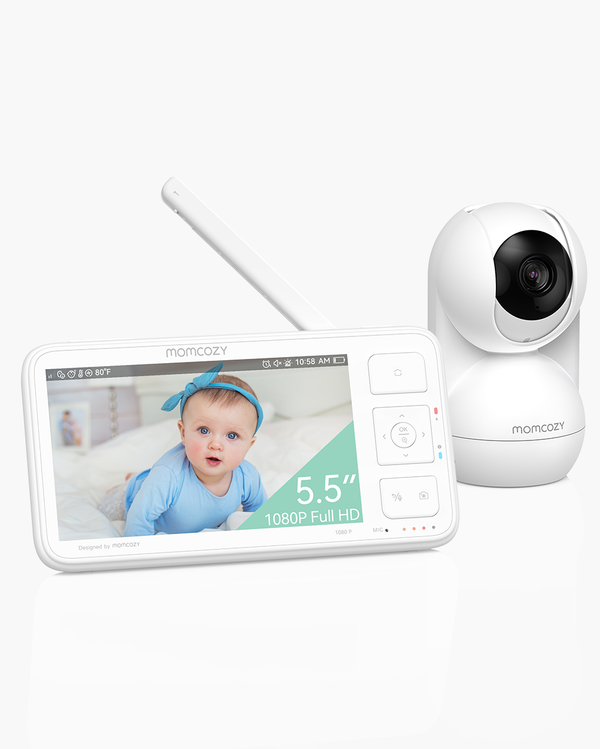
2. Momcozy 5.5-Inch Full HD Video Baby Monitor BM03: Best for Simple Local Video Monitoring
The BM03 is built for setups where simplicity and reliability matter more than remote access. There is no app, no login, and no internet dependency. A caregiver can pick it up and start monitoring within minutes, and handing it off to a new caregiver requires no account setup.
The 5.5-inch 1080p Full HD display gives a clear, detailed view of the nursery. The non-WiFi connection means the feed stays private without any configuration.
Why it works for daycare-style care:
- Non-WiFi, secure connection with no internet required
- Range up to 1,640 ft (500 m) through 2 walls
- Up to 5 days battery life with Vox and ECO mode
- Pan 360° / Tilt 140° with remote control from the parent unit
- Local video storage with included 32GB SD card
- Supports up to 4 cameras for multi-room coverage
Adding a Momcozy 1080P High-Performance Video Baby Monitor BM01 as a second camera gives split-view coverage of two rooms from the same BM03 parent unit. Parents who want to compare camera resolution, night vision, and range across different models will find the best video baby monitor roundup covers those details in depth.
5,5-Zoll groß
1640 Fuß Reichweite
Lokale Videospeicherung und -wiedergabe
Ultraklare Nachtsicht
3. Infant Optics DXR-8 Pro: Best for Secure Non-WiFi Viewing
For setups where privacy is the top concern and no one needs remote access, the Infant Optics DXR-8 Pro is a strong choice. It operates on a closed-loop FHSS system and never connects to the internet. There are no apps, no accounts, and no cloud storage. The signal stays private between the camera and the parent unit.
The patented Active Noise Reduction (ANR) technology filters out background noise from fans, air purifiers, and HVAC systems, so the caregiver hears the baby clearly without sorting through static.
Why it works for daycare-style care:
- Non-WiFi FHSS closed-loop system, hack-proof with no internet exposure
- Patented ANR filters background noise so only the baby's sounds come through
- 5-inch HD display, pan/tilt/zoom, interchangeable lenses
- Two-way talk and night vision
- Range up to 1,000 ft (305 m), supports up to 4 cameras
- No app, no subscription, no account required
For families who want a full comparison of encryption standards and privacy features across WiFi and non-WiFi options, the best secure baby monitor guide covers that in detail.
4. Babysense Max View: Best for Multi-Camera Split-Screen
The Babysense Max View comes with two cameras and a 5.5-inch split-screen display as standard. Both rooms are visible simultaneously on one screen, so the caregiver does not need to switch views or carry two parent units.
It uses a non-WiFi FHSS connection, so there is no app to manage and no network to rely on. The 5000mAh battery lasts up to 20 hours in ECO mode, covering a full care day without needing to charge.
Why it works for daycare-style care:
- Two cameras included from day one, no extra purchase needed
- 5.5-inch 1080p Full HD split-screen display shows both rooms at once
- Non-WiFi FHSS closed-loop system, hack-proof
- Pan/tilt/zoom with 4x zoom on each camera
- 5000mAh battery with up to 20 hours in ECO mode
- Night vision, two-way audio, temperature display
- Range up to 1,000 ft (305 m), supports up to 4 cameras
For families watching two babies or two rooms, the best baby monitor for twins guide covers multi-view setups in more detail.
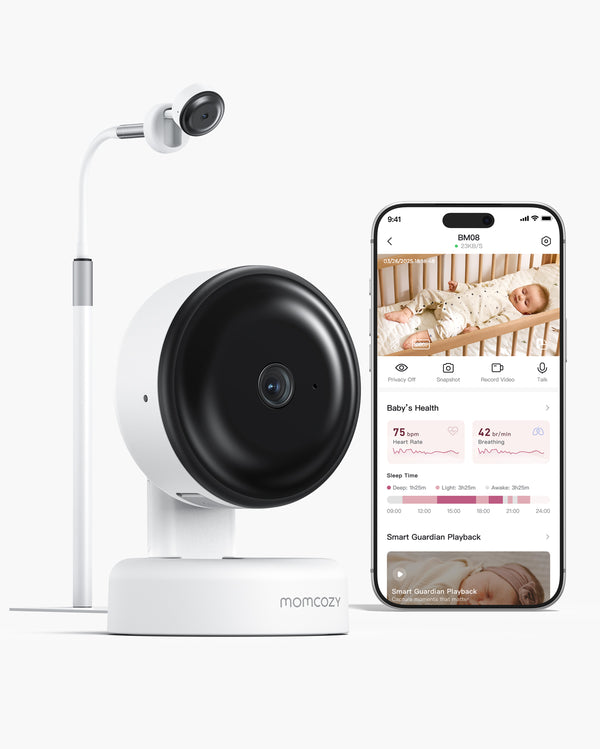
5. Momcozy Contact-Free Smart Baby Monitor BM08: Smart Option for One Baby Only
The BM08 is not the right primary monitor for a daycare setup with multiple children or rooms. It monitors one baby in one dedicated sleep space, using contact-free mmWave sensing to provide breathing dynamics, heart dynamics, and sleep insights with no wearables required.
Where it fits in a daycare context is as a focused option for a single infant's nap area alongside another monitor covering the rest of the setup.
Important: The BM08 is app-only, with no parent unit. It is not a medical device and is not intended for diagnosing or treating any health condition.
Comparison Table: Top Baby Monitor Options for Daycare-Style Setups
Each product above covers a different need. This table puts them side by side for a quick reference.
| Model |
Best For |
App/Phone |
Parent Unit |
Video |
Non-WiFi |
Monthly Fees |
| Momcozy BM04 |
App and parent-unit flexibility |
Yes |
Yes, 5-inch |
1080p |
Optional |
No |
| Momcozy BM03 |
Simple local video monitoring |
No |
Yes, 5.5-inch |
1080p |
Yes |
No |
| Infant Optics DXR-8 Pro |
Secure non-WiFi viewing |
No |
Yes, 5-inch |
720p |
Yes, FHSS |
No |
| Babysense Max View |
Multi-camera split-screen |
No |
Yes, 5.5-inch |
1080p |
Yes, FHSS |
No |
| Momcozy BM08 |
One baby, one sleep space only |
Yes |
No |
2K HD |
No |
No |
None of these options require a monthly subscription for core features.
No Wearables Required
No Monthly Fees
Cry & Face Covering Notifications
2K Night Vision
How to Set Up a Baby Monitor for Daycare-Style Care
Map the Space Before You Buy
Count the rooms and nap spaces first. If children sleep in separate rooms, plan for at least two cameras and confirm the parent unit supports split-screen or scan mode before purchasing.
Install With Safety First
- Keep all cords safely routed out of reach of children
- Mount cameras above mattress level with a clear view of the full nap area
- Confirm a stable power source at each camera location
Set Access Before Care Begins
- Assign viewing permissions to each person before the first care day
- For WiFi monitors, create separate accounts for caregivers and parents where the app allows
- For non-WiFi monitors, agree on who keeps the parent unit and the handoff process at the end of each day
Test Everything in Advance
- Confirm the parent unit connects to each camera reliably
- If the setup includes app viewing, test remote access from outside the home network
- Walk through the daily workflow with the caregiver before relying on the system during care hours
Technical setup is only part of the preparation. The other part is agreeing on who sees what, when, and under what conditions.
Privacy and Permission Checklist
Daycare-style monitoring involves more than one family's privacy, and those conversations are easier to have before the monitor goes live than after.
Access and Visibility
- Who can view the feed: caregivers only, or parents too?
- If parents have app access, are their permissions separate from the caregiver's login?
- Is there a shared understanding of when parents will and will not check in remotely?
Data and Recording
- Does the monitor record video automatically? If so, where is it stored?
- Is cloud storage enabled? Who has access to stored clips?
- Have all parties agreed on how recorded footage is handled and retained?
WiFi Monitor Security
- Is a strong, unique password set on the monitor account?
- Is the home router secured with WPA2 or WPA3 encryption?
- Are firmware and app updates applied regularly?
Non-WiFi Monitor Access
- Who has physical access to the parent unit?
- Is the parent unit returned or secured at the end of each care day?
A clear agreement between parents and caregivers about monitoring boundaries matters more than any technical setting.
FAQs
Q1: What Is the Best Baby Monitor for Daycare?
It depends on the care setup. For multiple rooms or children, a multi-camera or parent-unit monitor is the most practical starting point. For caregivers who need on-site access and parents who want remote check-ins, the Momcozy 5-Inch Dual-Mode Smart Baby Monitor BM04 covers both. For maximum privacy with no WiFi, the Infant Optics DXR-8 Pro or Babysense Max View are strong fits.
Q2: Can You Use a Regular Baby Monitor for Daycare?
A single-camera monitor may work for simple one-child setups, but daycare-style care usually needs more. Multiple rooms require multiple cameras or split-screen support. Privacy rules, caregiver access boundaries, and daily handoff logistics also matter more in a multi-child or multi-family setting.
Q3: Should a Daycare Baby Monitor Use WiFi or a Parent Unit?
For caregivers on-site, a parent unit is the more practical tool. It requires no phone and no network. For parents who want remote check-ins, app viewing is useful but needs clear account boundaries. A dual-mode monitor covers both.
Q4: How Many Cameras Do You Need for Daycare-Style Monitoring?
One camera covers one room. If children nap in separate rooms, two cameras with split-screen or scan mode is the practical minimum. The Babysense Max View includes two cameras as standard. The Momcozy BM03 and BM04 both support up to 4 cameras.
Q5: Is BM08 Good for Daycare?
The Momcozy Contact-Free Smart Baby Monitor BM08 is suited for one baby in one dedicated sleep space. For daycare setups with multiple children or rooms, the Momcozy BM04, BM03, or BM01 are more practical primary options. The BM08 can work as a supplementary monitor for a single infant's nap area alongside a multi-room setup.
Q6: What Privacy Rules Should Parents and Caregivers Agree On?
Before setup, agree on who can view the feed, whether recordings are stored and where, how app accounts are shared, and when remote check-ins will happen. For WiFi monitors, use separate logins where the app allows. For non-WiFi monitors, agree on who keeps the parent unit and when it is returned.
Find the Right Setup for Your Care Arrangement
What works for one nursery rarely works for a multi-room, multi-caregiver setup. Momcozy covers both ends of that spectrum, from the dual-mode Momcozy 5-Inch Dual-Mode Smart Baby Monitor BM04 for flexible caregiver and parent access, to the non-WiFi Momcozy 5.5-Inch Full HD Video Baby Monitor BM03 for simple local coverage. Compare Momcozy Baby Monitors to find the right fit for your setup.