La llegada de tu bebé a casa es sinónimo de alegría sin fin, pero también de noches sin descanso. Encontrar las herramientas apropiadas para vigilar a tu pequeño te ayudará a quitarte un peso de encima. De esta manera, te mantendrás al pendiente de él sin preocuparte por la seguridad. Encontrar un dispositivo que combine funciones sencillas con un hardware confiable hará que tu familia tenga una rutina más tranquila.
Puntos importantes
Para elegir el equipo adecuado, lo primero es tener claro qué es lo que necesitas para la habitación de tu bebé. Estos puntos destacan las características más importantes que debes tener en cuenta a la hora de comprar un monitor para bebés.
-
Privacidad: La transmisión local (con tecnología FHSS) suele ser más segura que la conexión wifi frente a piratas informáticos o hackers.
-
Calidad de audio: Escuchar el sonido con claridad es tan importante como ver una imagen nítida.
-
Rango de señal: Las paredes gruesas pueden interferir en las conexiones, así que busca modelos con un gran alcance de señal.
-
Duración de la batería: La unidad principal debe funcionar durante toda la noche sin necesidad de tener que enchufarla a un tomacorriente constantemente.
-
Instalación sencilla: Un buen equipo tecnológico debería funcionar correctamente ni bien lo enciendes, sin necesidad de usar aplicaciones complejas.
Establecer estas prioridades desde el principio hará que el proceso de compra resulte mucho menos abrumador cuando eres madre primeriza.
Obtener tranquilidad en la era digital
Vigilar a un bebé mientras duerme ha experimentado cambios con el tiempo. Ya no consiste en estar atenta a sus llantos desde cerca, sino en poder ver imágenes de video nítidas desde cualquier lugar. Hoy en día, puedes encontrar sistemas que te brindan una vista en primer plano sin que tu vida privada se vea expuesta en Internet.
| Problema |
Solución moderna |
Beneficio |
| Hackeo de información |
Conexión con tecnología FHSS en lugar de red Wifi |
Las señales permanecen dentro de tu hogar y no se puede acceder a ellas mediante Internet. |
| Demora de señal |
Hardware de baja latencia |
Ves y escuchas los movimientos en tiempo real sin retrasos. |
| Imágenes poco nítidas |
Resolución Full HD (1080p) |
Puedes ver si tu bebé está con los ojos abiertos o si está respirando cómodamente. |
Elegir el equipo tecnológico adecuado te ofrece alivio para poder completar las tareas del hogar o mejorar tus horas de sueño. Una máxima privacidad y alta resolución de video garantizan la protección de tu pequeño mientras sigues conectado con él.
Diferentes tipos de monitor para bebés
Primero debes conocer los diferentes tipos de modelos disponibles para saber cómo elegir un vigilabebés que se adapte a tu estilo de vida. Factores como la distribución de las habitaciones del hogar o las necesidades individuales influyen en el modelo de vigilancia que debes implementar para tu bebé.
Modelos que solo transmiten audio
Son monitores clásicos que transmiten audio pero no video. Tienen un precio accesible, una gran duración de la batería, y son perfectos para ti si no sientes la necesidad de estar observando la pantalla constantemente. Dado que consumen menos datos, el alcance suele ser mucho mejor que el de los modelos que transmiten video.
Monitores de video sin conexión wifi
Estos sistemas utilizan una señal específica (a menudo denominada FHSS) para enviar el vídeo directamente desde la cámara a una pantalla portátil. No necesitan conexión a Internet, lo que hace que sea prácticamente imposible hackearlos desde fuera de casa. Son la mejor opción para ti si buscas un modelo que se conecte automáticamente sin configuración previa.
Monitores con wifi
Estas cámaras se conectan a la red de Internet de tu casa y te permiten ver a tu bebé a través de una aplicación en tu teléfono. Es una gran opción si trabajas fuera de casa y quieres vigilar a tu bebé durante el día. Aun así, estos modelos dependen en gran medida de la velocidad de tu conexión a Internet y requieren contraseñas seguras para garantizar la seguridad.
Elegir entre los diferentes tipos de monitores dependerá tanto de si prefieres la comodidad de tener una aplicación para controlar la cámara como la fiabilidad y la privacidad de un modelo portátil de circuito cerrado.
Características “no negociables” de un monitor para bebés a la hora de comprar
Centrarte en las funciones básicas que nunca fallan es la mejor manera de encontrar un vigilabebés confiable. Buscar las siguientes especificaciones te ayudará a encontrar equipos de alta calidad que funcionan sin problemas en el día a día.
-
Video de alta resolución (Imagen nítida de día): Tu monitor debe contar con una resolución de 720p como mínimo. No obstante, considera elegir un modelo con resolución Full HD (1080p) si quieres tener detalles más nítidos del rostro de tu bebé e imágenes más definidas.
-
Visión nocturna con alta resolución: Casi todo el monitoreo se realiza en la oscuridad, por lo que una cámara que ofrezca una imagen borrosa por la noche no resulta muy útil. Busca modelos con LED infrarrojos invisibles que no despierten a tu bebé.
-
Audio bidireccional: Tener la opción de calmar a tu bebé con tu voz desde otra habitación puede ayudarte a menudo a evitar que se termine despertando por completo.
-
Pantalla de gran tamaño: Una pantalla de entre 5 y 5,5 pulgadas es el tamaño ideal para ver los detalles sin que el dispositivo resulte demasiado grande para llevarlo contigo a diario.
-
Detector de temperatura: Por lo general, los bebés duermen mejor cuando la temperatura de la habitación se mantiene dentro de unos límites seguros y agradables, por lo que un termómetro integrado te ayuda a detectar si la habitación se calienta o se enfría demasiado. La temperatura recomendada oscila entre los 20 y 22 °C (68 y 72 °F).
-
Modo VOX/Activación de sonido inteligente: La función VOX (detección de sonido automático) hace que se encienda la pantalla solo cuando tu bebé hace algún ruido, lo que permite que la batería del dispositivo dure más tiempo cuando lo usas por las noches.
-
Conexión segura: En el caso de que elijas un monitor sin wifi, busca una conexión segura de 2,4 GHz de tipo FHSS. Si elijes uno con conexión wifi, prioriza modelos que aseguren tener un cifrado robusto (por ejemplo, de 256 bits).
-
Duración de la batería: Prioriza modelos que garanticen un funcionamiento nocturno prolongado (de más de 12 horas de duración), ya que la duración de la batería suele ser uno de los problemas más comunes con los que se lidia a diario.
Una pantalla que cumpla todos estos requisitos cubrirá el 90 % de tus necesidades diarias. Al centrarte en estos aspectos básicos, te asegurarás de no pagar de más por “funciones extra” que, en realidad, no contribuyen a la seguridad de tu bebé.
Funciones avanzadas adicionales en un monitor para bebés
Una vez cubiertas las funciones básicas, puedes considerar buscar funciones avanzadas que te faciliten mucho la vida. Recuerda que estas no son realmente necesarias, pero aportan una mayor comodidad que, para muchas mamás, justifica el precio.
Cámara PTZ (con vista panorámica, inclinación y zoom)
A medida que tu pequeño crece, comienza a desplazarse, no solo en su cuna, sino alrededor de toda la habitación. Una cámara que se puede controlar remotamente desde la unidad principal te permite vigilar los movimientos de tu bebé sin tener que entrar a su habitación o correr el riesgo de levantarlo. Esta característica es especialmente útil si planeas usar el monitor a largo plazo.
Vinculación de múltiples cámaras
Si tienes gemelos o planeas tener otro hijo muy pronto, busca sistemas que te permitan vincular una segunda o tercera cámara a la misma unidad principal. Algunos monitores permiten "dividir la pantalla" para tener una vista simultánea de dos habitaciones.
Monitoreo del sueño y la respiración del bebé
Los monitores “inteligentes” de gama alta utilizan ahora la inteligencia artificial para registrar los movimientos respiratorios y los patrones de sueño de tu bebé sin necesidad de utilizar sensores portátiles. Te pueden alertar si no detectan movimiento o proporcionar un informe diario sobre el sueño de tu bebé. Si bien son funciones premium, te garantizan una seguridad indescriptible si te consideras ansiosa.
Funciones de relajación incorporadas
Algunos modelos avanzados tienen un diseño dos en uno, por lo que pueden incluir luces de noche, una máquina de ruido blanco o un reproductor de canciones de cuna. De esta manera, mantienes ordenada la habitación de tu bebé al reducir el número de aparatos que hay que enchufar, lo que te permite controlar el entorno de la habitación de tu bebé directamente desde el monitor.
App Control Remoto
Rutina Dormir-Despertar
Luz LED 7 Colores
34 Sonidos
Con estas funciones adicionales, tu monitor pasa de ser una simple herramienta de cuidado a un dispositivo de seguridad del hogar a largo plazo. De esta manera, tampoco tendrás que comprar distintos equipos más adelante.
Características de un monitor para bebés que debes evitar
También es importante entender que tener muchas funciones tecnológicas no siempre es mejor. Algunas de estas pueden generarte más estrés que alivio. Aprende cómo elegir un vigilabebés que no te genere cansancio con sus “falsas alarmas.”
Almohadillas y prendas con detectores de movimiento extremadamente sensitivos
Los detectores de movimiento que requieren contacto físico (como las almohadillas o los calcetines inteligentes) son conocidos por activar alarmas simplemente porque el bebé ha cambiado de postura o se le ha caído un calcetín. Esto suele generar más pánico que tranquilidad.
Análisis del “estado de ánimo” del bebé con inteligencia artificial
No te confíes de los monitores que afirman que pueden “traducir” el llanto de tu bebé o analizar su estado de ánimo. Estas funciones suelen carecer de base científica y pueden llevarte a analizar en exceso el comportamiento normal de un bebé. Recuerda que el seguimiento básico del sueño puede resultar útil, pero la “detección del estado de ánimo” suele ser solo una estrategia de marketing.
Dispositivos cuyas suscripciones son cuestionables
En algunos monitores, debes pagar una suscripción mensual para acceder a funciones básicas, como sonido de fondo, alertas de movimiento o seguimiento del sueño de tu bebé. Comprueba siempre que el dispositivo sea realmente útil ni bien lo enciendas, sin necesidad de usar una tarjeta de crédito para desbloquear funciones básicas.
Pantallas pequeñas (con menos de 4 pulgadas)
Las pantallas que tienen menos de 4 pulgadas son prácticamente inservibles en 2026. A las 2 de la madrugada, cuesta saber si tu bebé tiene los ojos abiertos cuando miras una pantalla diminuta y de baja resolución.
Evitar estas características obsoletas te ayuda a centrarte en lo que realmente importa como mamá. Al final, las herramientas más prácticas y confiables suelen dar mejores resultados que los dispositivos engañosos más llamativos.
¿Cómo mantengo mi conexión privada?
La seguridad no se limita a resguardar la salud física de tu bebé; también abarca garantizar la seguridad digital y la protección de los datos de tu familia. En 2026, los hackers son cada vez más inteligentes, por lo que tu elección de hardware debe ser aún más acertada.
-
Prioriza la seguridad local (tecnología FHSS): En los monitores sin wifi, el espectro ensanchado por salto de frecuencia (FHSS por sus siglas en inglés) es la técnica de defensa estándar. Las señales que transmite cambian constantemente de canal, lo que dificulta que alguien pueda interceptarlas sin estar físicamente cerca.
-
Permite la verificación en dos pasos (2FA): Si se trata de un monitor con wifi, la verificación en 2 pasos es una función no negociable. Esta garantiza que, aunque alguien te robe la contraseña, no pueda acceder a las imágenes de la cámara sin ingresar primero un código de verificación desde tu teléfono.
-
Actualiza el firmware constantemente: Los hackers intervienen software desactualizados. Ya se trate de una unidad principal de circuito cerrado o de una cámara con conexión wifi, instala siempre las últimas actualizaciones del fabricante para corregir las vulnerabilidades de seguridad descubiertas recientemente.
-
Contraseñas únicas y complejas: Nunca dejes que tu cámara con conexión wifi mantenga la configuración por defecto. En lugar de mantener la contraseña proporcionada por el fabricante, como “1234”, elige una contraseña única y compleja que no uses en otro dispositivo.
-
Usa la "red de invitados": Para aumentar la seguridad, conecta tu monitor para bebés a la "red de invitados” del router. Al hacer esto, aíslas la cámara de tus ordenadores personales y de tus dispositivos de almacenamiento de datos, creando un cortafuegos digital.
-
Desactiva el acceso remoto (cuando no lo necesitas): Si realmente no necesitas vigilar a tu bebé desde fuera de tu hogar, desactiva la opción de "ver desde cualquier sitio" en la configuración de la aplicación móvil para bloquear el tráfico externo.
Un monitor que es seguro funciona como un circuito cerrado que permanece dentro de tu hogar. Prioriza las medidas de seguridad mencionadas anteriormente para asegurarte de que las únicas personas que vigilan a tu bebé sean aquellas en las que confías.
El mercado está repleto de opciones, así que necesitas una estrategia para encontrar el modelo con la mejor relación de calidad-precio. A la hora de comprar artículos para bebés, hay que ir más allá del bonito empaque y fijarse en la calidad real de fabricación.
Lee reseñas verificadas
No te fijes solo en las valoraciones de 5 estrellas. Filtra las reseñas con la etiqueta “Compra verificada” de los últimos seis meses, prestando especial atención a las valoraciones de 3 y 4 estrellas. Estas últimas suelen dar opiniones honestas, ya que te contarán los detalles prácticos (como "la batería solo dura 6 horas, no 12") sin el sesgo de las promociones pagadas ni las críticas destructivas.
Revisa las políticas de garantía y devoluciones
Fíjate que la garantía sea de 2 años (o al menos de un año) y que el plazo de devolución sea de 30 días "sin necesidad de brindar explicaciones". Usarás el monitor durante todo el día, todos los días. Las baterías se agotan y los dispositivos se estropean. Pero lo más importante es que la intensidad de la señal inalámbrica depende de las paredes de tu hogar. Necesitas un periodo de prueba para asegurarte de que el monitor realmente funcione dentro de él.
Considera la capacidad de ampliación y la función de pantalla dividida
No te limites a comprobar si admite vincular más cámaras; también comprueba si admite el modo de pantalla dividida. Imagina que tienes otro hijo pronto. No quieres tener un monitor que intercala entre lo que muestran ambas cámaras cada 10 segundos; quieres uno que te permita ver a tus pequeños de forma simultánea.
Por lo general, es mejor comprar productos de marcas de confianza que cuenten con un servicio de atención al cliente especializado que elegir la opción más barata en una tienda en línea genérica. Un buen servicio de atención puede ayudarte a resolver rápidamente los problemas relacionados con la señal o la batería.
¿Por qué Momcozy está estableciendo estándares más exigentes para los monitores para bebés?
Algunas marcas se centran en lograr la intersección entre privacidad, facilidad de uso y alta calidad de video. Momcozy se ha ganado una reputación por crear diseños pensados para las madres que dejan de lado los adornos innecesarios y se enfocan en la confiabilidad. Aquí tienes dos opciones destacadas de Momcozy que se adaptan a diferentes estilos de crianza.
| Característica |
BM01 Momcozy (El especialista en privacidad) |
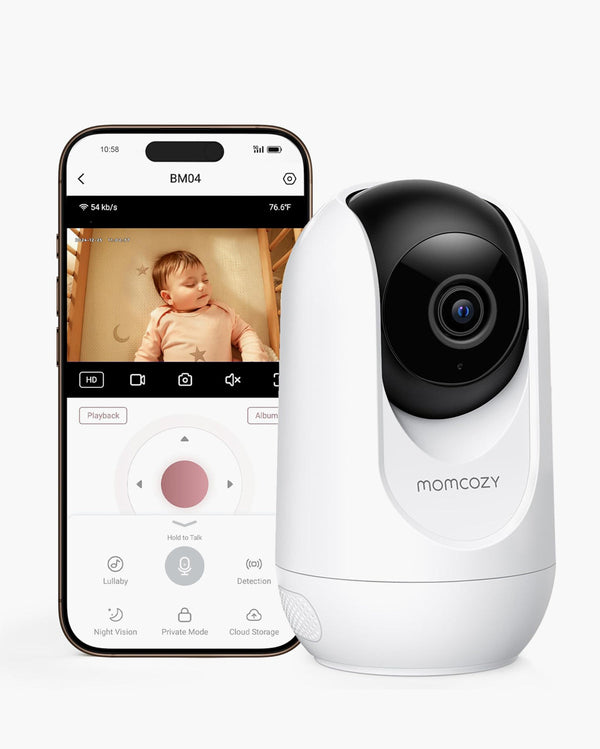
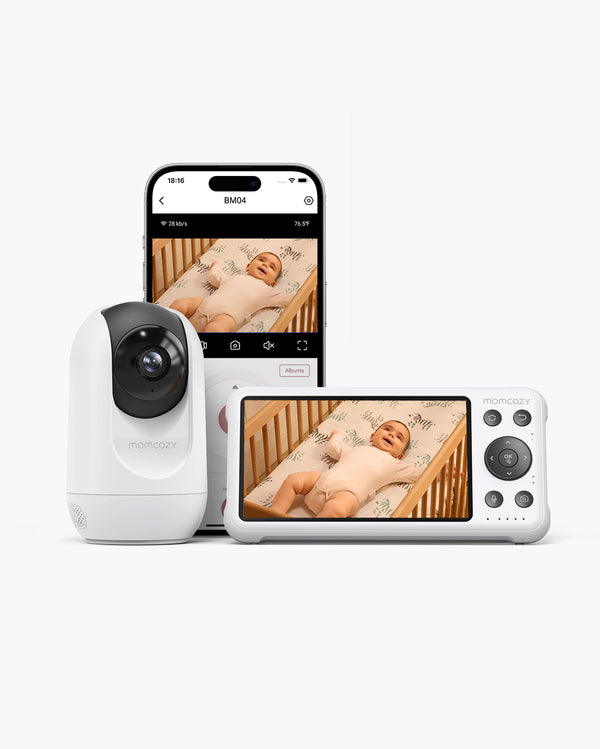
BM04 Momcozy (El líder híbrido) |
| Público objetivo |
Mamás que priorizan la privacidad y buscan simplicidad, sin exponerse a riesgos de hackeo. |
Mamás modernas que trabajan y necesitan acceso remoto y deben supervisar a más de un hijo. |
| Tipo de conexión |
Sin conexión wifi (circuito cerrado)
La transmisión de video es local. No requieres conexión a Internet.
|
Modo dual (funciona con y sin conexión wifi)
Transmisión cerrada para el hogar y aplicación móvil para visualización remota.
|
| Visualización remota |
No. Solo es para transmisión cerrada dentro del hogar. |
Sí. Se puede visualizar en la aplicación móvil desde cualquier lugar. |
| Movimiento de la cámara |
Control remoto de vista panorámica, inclinación y zoom |
Control remoto de vista panorámica, inclinación y zoom |
| Visualización de múltiples cámaras |
Pantalla dividida y modo de bucle |
Pantalla dividida (visualiza dos habitaciones de forma simultánea) |
| Seguridad |
Señal local FHSS a prueba de hackeos |
Señal local FHSS y transmisión mediante conexión wifi cifrada |
| Alertas inteligentes |
Modo VOX (Detección de sonidos) |
Uso de IA avanzada (Alertas por detección de movimiento, llanto y peligros) |
| Duración de la batería |
Alrededor de 11 horas y 30 minutos (con la pantalla encendida)
Alrededor de 22 horas (con el modo VOX)
|
10 horas (pantalla encendida en todo momento)
20 horas (modo regular)
|
| Calidad-precio |
Precio accesible por buena calidad |
Precio elevado por gran calidad y versatilidad |
Veredicto inmediato:
-
Elige el BM01 si no te gusta que las grabaciones de tu bebé sean propensas a circular en línea y prefieres un dispositivo que se conecta automáticamente y que cumple a la perfección con lo básico.
-
Elige el BM04 si sueles viajar, trabajas hasta tarde fuera de casa, tienes o planeas tener varios hijos, y necesitas un dispositivo flexible que te permita visualizarlos desde tu teléfono o la pantalla dividida del monitor.
De $179.99 CAD $203.33 CAD
Sin Wi-Fi
1080p Full HD
Larga duración de batería
Modo de pantalla dividida
App or Parent Unit
Danger Zone Alert
Storage Supported
Vox Mode
Las necesidades de cada familia son únicas. Ya sea que necesites un modelo que solo transmita audio, un monitor con un tamaño de pantalla diferente o un paquete de ofertas específico, explora toda la colección de monitores para bebés Momcozy en busca del dispositivo perfecto para la habitación de tu bebé.
¿Cómo puedo usar un monitor para bebés de forma segura?
Tener la tecnología más avanzada del mundo no servirá de nada si no configuras correctamente el monitor. La seguridad implica saber dónde colocarlo y cómo reaccionar a las alertas que emite.
-
Cables asegurados (la regla del metro): Mantén la cámara y todos los cables al menos un metro alejados de la cuna. Los bebés pueden meter las manos entre los tablones que sostienen el colchón y tirar de los cables que cuelgan, lo que supone un grave riesgo de estrangulamiento. Consejo de experta: Usa protectores rígidos para cables y colócalos en la pared para ocultar por completo los cables que cuelgan.
-
Distancia y alturas seguras para montar la cámara: Coloca la cámara en un lugar elevado (de ser posible, a más de 1,80 metros) en una pared o en un estante resistente para obtener una vista completa “desde arriba”. Asegúrate de que el estante esté bien fijado para que no se caiga en la zona en la que descansa tu bebé si recibe un golpe.
-
Configuración de sensibilidad inteligente: En lugar de limitarte a subir el volumen, ajusta la sensibilidad del modo VOX (activación por voz). Configúralo para que te mande una alerta solo en caso de llanto prolongado, filtrando el sonido que emite una máquina de ruido blanco o los pequeños crujidos. Así también previenes "cansarte por falsas alarmas” y te aseguras de no perderte una alerta real.
-
La regla de los "ojos siempre puestos" en el bebé: Recuerda que el monitor es una herramienta y no una solución para dejar de vigilar a tu bebé en persona. Si observas algo raro o el monitor se desconecta, sigue siempre tu instinto y revisa la habitación de inmediato.

Elige un monitor para bebés que garantice seguridad
Usar el dispositivo adecuado cambiará tu día para bien. Un monitor para bebés te permite crear un espacio seguro para que tu bebé descanse al enfocarte en factores como una señal privada y funciones de video nítido. La tecnología debería hacer tu vida y la de tu familia más tranquilas; no debería aumentar sus niveles de estrés. Puedes estar tranquila sabiendo que tu bebé está a salvo gracias a un práctico sistema que se adapta a la distribución de tu hogar y a tu estilo de vida.